How Fitbit Monitors Heart Rate: A Simple Guide
If you’ve ever wondered how your Fitbit tracks your heart rate without wires or chest straps, the answer lies in a sophisticated blend of light, sensors, and smart algorithms. Fitbit monitors heart rate using optical technology that measures blood flow through your wrist in real time, providing continuous insights into your cardiovascular activity throughout the day and during workouts.
This non-invasive system works 24/7, capturing everything from resting heart rate to peak exertion levels. Unlike chest straps that detect electrical signals, Fitbit uses light to sense changes in blood volume with every heartbeat. The result is a seamless, always-on health tracker that adapts to your body and lifestyle.
In this guide, you’ll learn exactly how the optical sensors work, how heart rate zones are calculated, what affects accuracy, and how to get the most reliable readings from your device.
Optical Heart Rate Technology Explained
Fitbit relies on optical heart rate monitoring, a method that uses light to detect blood flow beneath the skin. This technology enables continuous tracking without interrupting your daily routine.
Green LED Sensors in Action
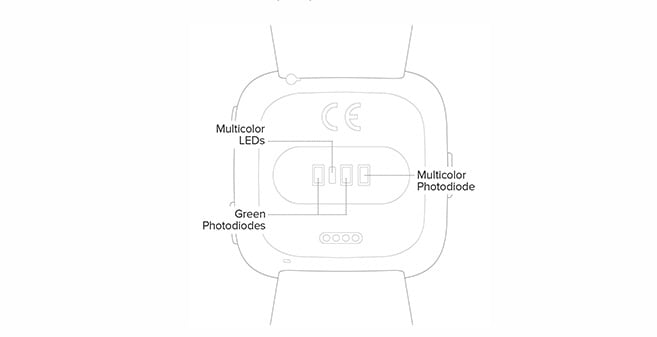
At the core of every Fitbit with heart rate monitoring are green LED lights positioned on the back of the device. These LEDs flash rapidly, shining light into the capillaries in your wrist.
When your heart beats, blood flow increases, absorbing more green light. Between beats, less blood is present, so more light reflects back. Photodiodes (light-sensitive sensors) measure these tiny fluctuations in reflected light.
The pattern of absorption and reflection creates a waveform that mimics your pulse. Fitbit’s algorithm analyzes this signal to calculate your beats per minute (bpm) in real time.
Why Green Light?
Green light is ideal for wrist-based monitoring because:
- It is highly absorbed by red blood cells, increasing contrast between high and low blood volume
- It penetrates skin effectively while minimizing interference from ambient light
- It provides consistent results across different skin tones when paired with proper fit
While some fitness devices use red or infrared light for sleep tracking, Fitbit primarily uses green LEDs for daytime and workout heart rate accuracy.
Infrared Light for Wear Detection
In addition to green LEDs, Fitbit devices use infrared light to detect whether the device is being worn. This helps prevent false readings when the watch is not in contact with your skin.
The infrared sensor activates periodically to check for skin proximity. If detected, the green LEDs engage for continuous heart rate tracking. If not, the system conserves battery by pausing readings.
This dual-light system ensures data is only collected under valid conditions, improving both accuracy and efficiency.
Resting vs. Real-Time Heart Rate Tracking

Fitbit distinguishes between active exertion and recovery states, offering two key metrics: real-time heart rate and resting heart rate.
Real-Time Heart Rate Monitoring
Your current heart rate updates dynamically on-screen during activities. You can view it:
- On the Heart Rate tile by swiping on compatible devices
- In the Exercise app during workouts
- Via voice commands on Pixel Watch using Gemini
This metric reflects immediate cardiovascular demand, such as when climbing stairs or sprinting. It adjusts within seconds of effort changes, helping you stay in target zones.
Resting Heart Rate (RHR) Insights
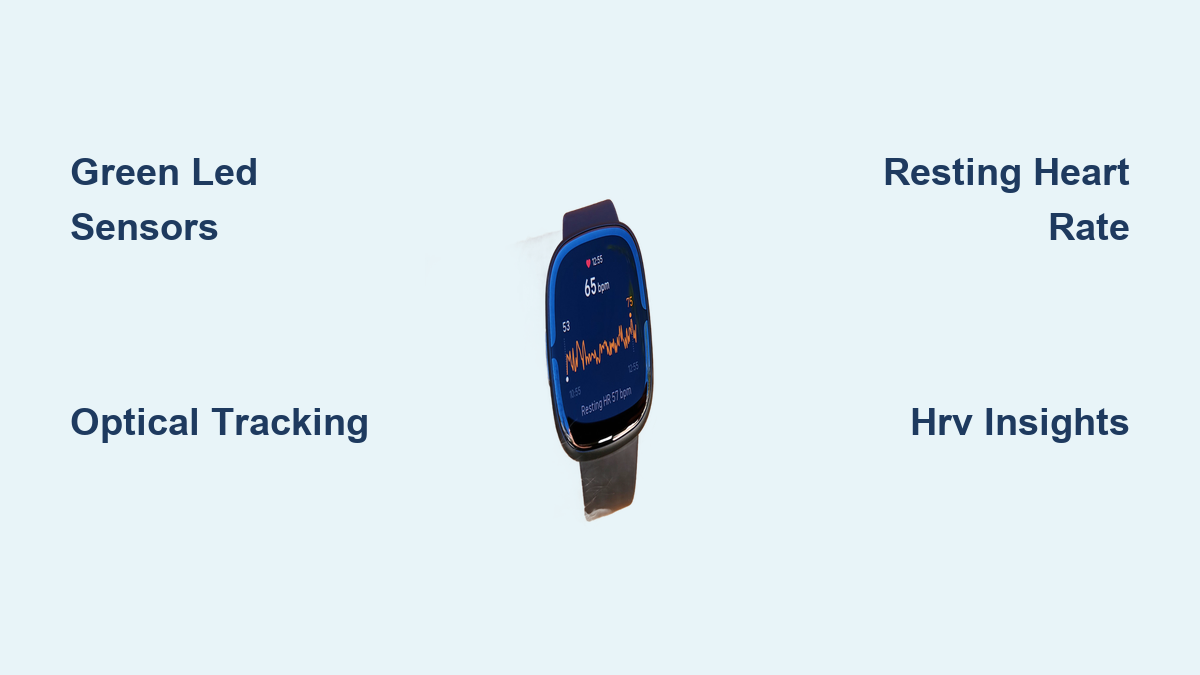
Resting heart rate is your heart’s rate when fully at rest, typically between 60 and 100 bpm, though elite athletes may be lower.
Fitbit estimates RHR based on periods of inactivity throughout the day, especially during calm moments like sitting or relaxing. A lower RHR generally indicates better cardiovascular fitness, as a stronger heart pumps more efficiently.
Factors That Influence RHR
- Increases RHR: Stress, caffeine, alcohol, fever, dehydration, medications, poor sleep
- Decreases RHR: Regular exercise, meditation, deep breathing, high aerobic fitness
Note: Resting heart rate differs from sleeping heart rate, which is measured continuously overnight and often runs slightly lower due to deeper physiological calm.
Understanding Heart Rate Variability (HRV)
Beyond beats per minute, Fitbit measures Heart Rate Variability (HRV), a powerful indicator of nervous system balance and recovery status.
What HRV Tells You
HRV tracks the millisecond variations between heartbeats. Even at a steady rate of 60 bpm, your heart does not beat exactly once per second. These micro-pauses are controlled by your autonomic nervous system.
Fitbit calculates HRV using the RMSSD (Root Mean Square of Successive Differences) formula, analyzing data from your longest sleep period over the past 24 hours, but only if it lasts more than 3 hours.
Interpreting HRV Trends
- Higher HRV: Suggests good recovery, fitness, and stress resilience
- Lower HRV: May signal illness, overtraining, anxiety, or poor sleep
Over time, improving HRV correlates with better cardiovascular health and mental well-being.
Accessing HRV Data
HRV trends are available in the Google Health app under the Vitals section. You can view changes over 7 days, 1 month, 3 months, or 1 year. This long-term view helps identify patterns linked to lifestyle choices, training intensity, or health events.
Personalized Heart Rate Zones

Fitbit does not just track raw numbers. It turns them into actionable insights using heart rate zones tailored to your fitness level.
Two Zone Calculation Methods
Method 1: Heart Rate Reserve (HRR) on Newer Devices
Used by Google Pixel Watch, Charge 6, Sense 2, Versa 4, Inspire 3, Charge 5, Inspire 2, and Charge 4.
This method personalizes zones based on:
- Max HR =
220 - Age - Resting HR (measured daily)
- Heart Rate Reserve (HRR) = Max HR – Resting HR
Each zone is calculated as a percentage of HRR added back to Resting HR:
Target HR = (Zone % × HRR) + Resting HR
This means two people of the same age but different fitness levels will have different zone ranges, making it more accurate.
HRR Zone Breakdown
- Light: Below 40% of HRR (casual walking)
- Moderate (Fat Burn): 40–59% of HRR (brisk walking)
- Vigorous (Cardio): 60–84% of HRR (running, cycling)
- Peak: Greater than 85% of HRR (sprinting, HIIT)
Method 2: Percentage of Maximum Heart Rate on Older Models
Used by Charge 3, Alta HR, Blaze, and earlier versions.
These use fixed percentages of estimated Max HR, without adjusting for Resting HR:
- Below Zones: Below 50% of Max HR
- Fat Burn: 50–69% of Max HR
- Cardio: 70–84% of Max HR
- Peak: Greater than 85% of Max HR
While simpler, this method is less personalized and may misrepresent effort for highly fit users.
Active Zone Minutes (AZM)
AZM counts minutes spent in Fat Burn, Cardio, or Peak zones. Each minute contributes differently:
- 1 min Moderate = 1 AZM
- 1 min Vigorous = 2 AZM
- 1 min Peak = 3 AZM
The goal is 150 moderate or 75 vigorous minutes per week, aligning with WHO guidelines.
Note: Swim-based AZM is no longer supported on most Fitbit devices due to signal interference in water.
Device Compatibility & Data Access
Not all Fitbit models offer the same heart rate features. Knowing your device’s capabilities ensures you use it effectively.
Models With 24/7 Heart Rate Monitoring
Fitbit devices with heart rate sensors include:
- Google Pixel Watch (1st & 2nd Gen)
- Fitbit Charge 6, 5, 4, 3
- Fitbit Sense, Sense 2
- Fitbit Versa 2, 3, 4
- Fitbit Inspire 2, 3, HR
- Fitbit Ionic, Surge, Blaze, Alta HR
Models without heart rate monitoring include the original Fitbit Alta and Fitbit Air (no on-device display; requires app).
How to View Heart Rate by Device
- Pixel Watch: Swipe left to find the Heart Rate tile, then tap for a detailed graph
- Versa 4 / Sense 2: Swipe right or left to see current rate and a 4-hour trend
- Other Screened Devices: Swipe up to view bpm plus zone or RHR
- Fitbit Air: Open the Google Health app only
During workouts, stats cycle automatically on most models, showing real-time heart rate and zone progress.
Advanced Health Features: ECG & Alerts
Beyond basic tracking, select Fitbit devices offer medical-grade tools for heart health monitoring.
ECG App for Atrial Fibrillation Detection
Available on Sense, Sense 2, Charge 5, Charge 6, and Pixel Watch (1st & 2nd Gen).
This FDA-cleared app measures your heart’s electrical activity in 30 seconds. By placing your finger on the watch bezel, you complete a circuit that records rhythm.
It can detect signs of Atrial Fibrillation (AFib), an irregular heartbeat linked to stroke risk. Results are stored in the Google Health app and can be shared with doctors.
High/Low Heart Rate Notifications
Supported on Pixel Watch, Charge 6, Versa 4, Sense 2, Inspire 3, Charge 5, Versa 3, and Sense.
If your heart rate exceeds or falls below user-defined thresholds after 10 minutes of inactivity, you’ll get an alert.
Customization Options
- Set custom high/low limits
- Use age-based defaults
- Log symptoms, medications, or triggers directly in the app
These logs help identify patterns and provide valuable context for healthcare providers.
Maximizing Accuracy: Fit & Placement Tips
Even the best tech needs proper setup. Here is how to get reliable readings every time.
Optimal Wrist Placement
- Daily Wear: Position one finger’s width above the wrist bone
- During Exercise: Move higher on the forearm and tighten the band
- Avoid: Loose fit, rotation, or sliding
Snugness Check: A pinky finger should just fit between band and skin. Too tight restricts blood flow; too loose causes motion noise.
Activity-Specific Adjustments
Certain movements challenge optical sensors:
- Cycling: Keep watch stable and avoid gripping handlebars tightly
- Weightlifting: Wrist flexion can block sensors; consider upper-arm wear
- HIIT: Rapid movements may cause temporary lag; use a chest strap for precision
Band-Specific Fit Instructions (Fitbit Air)
- Woven Band: Slide over hand, position behind wrist bone. Push buckle down while pulling band back. Wrap Velcro over device.
- Active Band: Thread bottom through top loop, tighten, secure peg. Slide loose end flat.
- SoftFlex Band: Slide on, position behind bone. Push buckle, fold over pebble, lock metal end.
Maintenance for Clear Signals
- Clean the sensor window weekly with a soft, damp cloth
- Remove sweat, lotion, or dirt buildup
- Avoid wearing over tattoos (ink absorbs light)
- Remove other bracelets that push the device away from skin
Accuracy Improvements & Model Comparisons
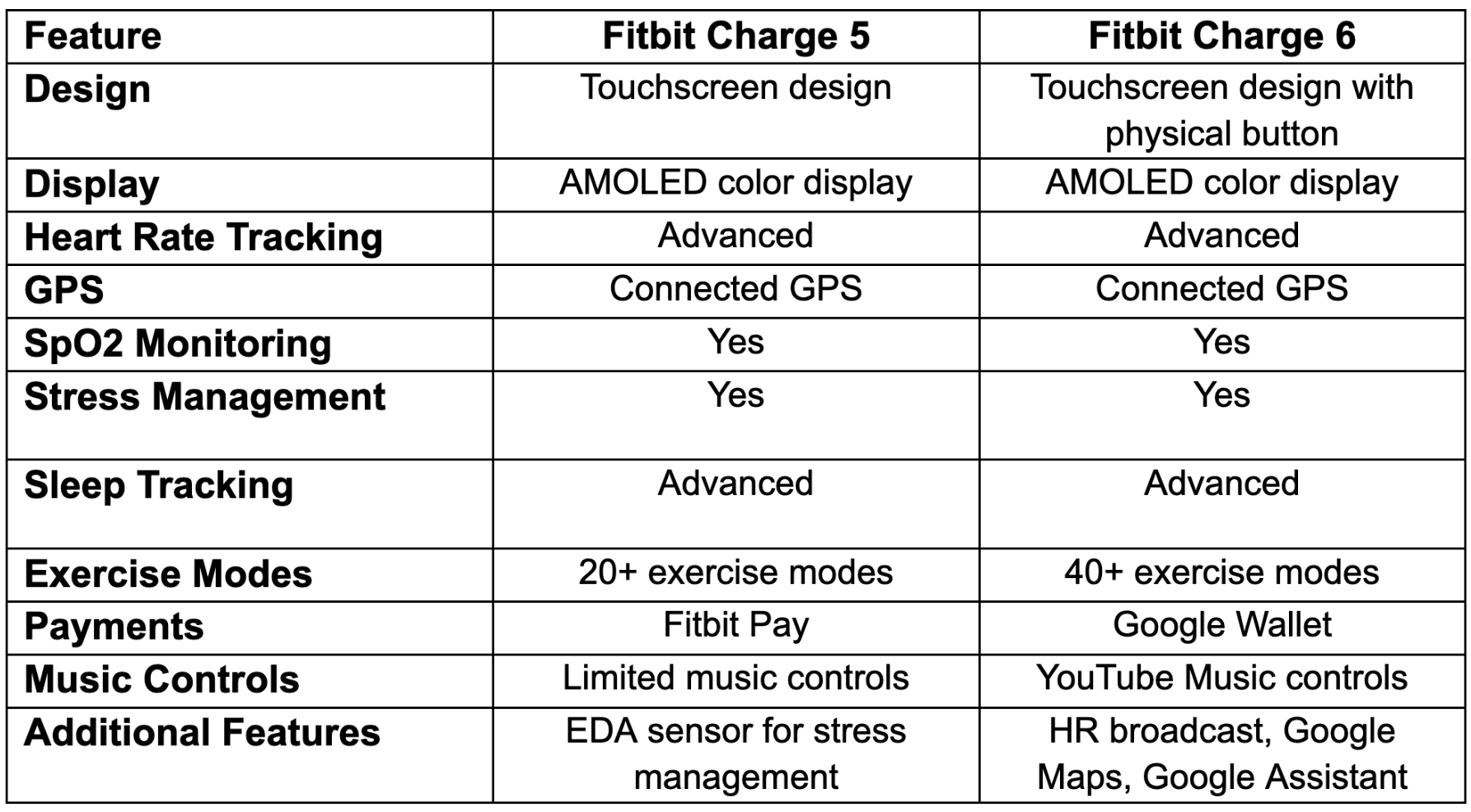
Newer Fitbit models deliver significantly better heart rate tracking, especially during intense workouts.
Latest Performance Benchmarks (March 2024)
- Fitbit Charge 6: Up to 60% more accurate in HIIT, spinning, and rowing
- Pixel Watch 2: Up to 40% more accurate in vigorous activities
These gains come from enhanced optical sensor arrays, improved motion artifact filtering, and smarter algorithms using HRR personalization.
Troubleshooting Common Issues
If your heart rate readings seem off, do not assume the device is faulty. Most issues stem from fit, placement, or connectivity.
Why Readings May Be Inaccurate
- Loose band causes poor skin contact
- Cold hands reduce blood flow
- Tattooed wrist absorbs light
- Excessive movement creates motion noise
- Low battery reduces sensor activity
Fix Sync Problems Between Device & App
If heart rate shows on your watch but not in the Google Health app:
- Open the app
- Check connection status
- Force sync manually
- Restart both device and phone if needed
Resolving Missing Alerts
If high/low heart rate notifications are not triggering:
- Go to Settings > Heart Rate > High & Low Alerts
- Confirm thresholds are set
- Ensure inactivity duration is correct (must be idle 10+ minutes)
- Update firmware if prompted
Integrating With the Google Health Ecosystem
All heart rate data flows into the Google Health app, where it becomes part of a holistic health picture.
What You Can Track
- Current heart rate
- Resting heart rate trends
- Heart rate zones during exercise
- HRV during sleep
- Symptom logs from notifications
Long-Term Insights
View data in daily graphs, weekly summaries, monthly trends, or yearly comparisons. Use “Learn More” sections in the app to understand how RHR and HRV are calculated, helping you interpret changes confidently.
Frequently Asked Questions About Fitbit Heart Rate Monitoring
How accurate is Fitbit’s optical heart rate monitor?
Fitbit’s optical sensors perform well during steady-state activities like walking or running. During high-intensity workouts with rapid wrist movement, accuracy can drop. Newer models like Charge 6 and Pixel Watch 2 show up to 60% better accuracy in vigorous activities compared to older versions.
Can Fitbit detect heart conditions like AFib?
Yes, select devices (Sense, Sense 2, Charge 5, Charge 6, Pixel Watch 1st & 2nd Gen) feature an FDA-cleared ECG app that can detect signs of Atrial Fibrillation. Results should always be discussed with a healthcare provider for diagnosis.
Why does my heart rate reading look different from gym equipment?
Differences are common because gym machines and chest straps use electrical or handlebar sensors, while Fitbit uses optical wrist-based technology. Wrist placement, fit, and motion can all cause minor variations.
Does Fitbit track heart rate during sleep?
Yes, devices with 24/7 monitoring track sleeping heart rate continuously overnight. Fitbit also calculates HRV from your longest sleep period (over 3 hours) to assess recovery and nervous system balance.
Why is my heart rate not showing in the Google Health app?
This usually indicates a sync issue. Check the app’s connection status, force a manual sync, and restart both your phone and device. Ensure your device firmware is up to date.
Do tattoos affect Fitbit heart rate accuracy?
Yes, tattoos on the wrist can interfere with optical sensors because ink absorbs light differently than skin. If you have wrist tattoos, try wearing the device on your non-dominant wrist or slightly higher on the forearm.
Key Takeaways for Understanding Fitbit Heart Rate Monitoring
Fitbit’s heart rate system combines green LEDs, infrared detection, and advanced algorithms to deliver continuous, personalized insights. The technology measures blood flow changes through your skin, then translates that data into real-time bpm, resting heart rate, HRV, and personalized zones.
To get the most reliable readings, wear your device snugly about a finger’s width above your wrist bone, keep the sensor clean, and update firmware regularly. Newer models offer significantly better accuracy, especially during intense workouts.
Your next step: open the Google Health app, review your resting heart rate and HRV trends over the past month, and identify one habit (better sleep, consistent exercise, or stress management) that could improve both metrics.