Fix Schwinn IC4 Heart Rate Monitor Not Working
You’re not alone if your Schwinn iC4 heart rate monitor stops responding during workouts. After a firmware update, especially around versions like 13.31 to 17.11, many users report Bluetooth pairing failures, lost connections, or sensors that won’t sync at all. Whether you’re using a Garmin Fenix 8, Forerunner 955, or another compatible device, a sudden loss of heart rate or cadence data can derail your training. The issue often isn’t your monitor. It’s a known Bluetooth communication bug introduced in recent firmware updates.
This guide reveals proven fixes, workarounds, and troubleshooting steps to get your Schwinn iC4 heart rate monitor working again. You’ll learn how to reset sensors, force re-pairing, use logging tools for diagnostics, and when to contact support with the right evidence. Whether you’re mid-workout or setting up for the first time, these steps will help you regain reliable heart rate tracking in minutes.
Confirm the Real Problem
Before diving into fixes, determine whether the issue is with the heart rate monitor itself or the bike’s Bluetooth sensor system. The Schwinn iC4 doesn’t have a built-in chest-strap-style heart rate monitor. Instead, it uses handlebar pulse sensors and supports external Bluetooth HR straps. Many users confuse connectivity issues with the bike’s cadence and speed sensor as heart rate monitor failures.
Check What You’re Actually Using
- Handlebar Pulse Sensors: Located on the front handles. Require skin contact and won’t work with gloves.
- External HR Strap: Must be Bluetooth 4.0+ compatible (ANT+ not supported).
- iConsole App or Third-Party Apps: Zwift, Peloton, or Garmin Connect may show “no signal” if pairing fails.
If your external heart rate strap isn’t connecting, but cadence or speed data works, the problem is likely isolated to HR pairing. If nothing connects, including speed and cadence, it’s likely a broader Bluetooth sensor failure tied to firmware.
Rule Out Common Mistakes
- Are you using a Bluetooth LE (Low Energy) heart rate monitor?
- Is the HR strap charged and turned on?
- Did you pair it via the correct app or device menu, not just the bike screen?
- Are other Bluetooth devices like AirPods or phones working nearby?
Garmin users especially report issues post-update, even when the same strap works on older watches. This confirms the root cause: firmware conflicts between the iC4 and updated devices, not faulty hardware.
Reset the iC4 Bluetooth System
A soft reset clears corrupted Bluetooth caches and forces the bike to rediscover sensors. This fixes temporary glitches after failed pairing attempts.
Power Cycle the Bike
- Unplug the iC4 from power for 60 seconds.
- Press and hold the Start button for 10 seconds to drain residual power.
- Plug back in and wait for the console to fully boot.
- Pedal lightly to activate the internal sensors.
Pro Tip: Always pedal for 10–15 seconds before attempting sensor pairing. The iC4 only broadcasts Bluetooth signals when motion is detected.
Clear Bluetooth Pairing History
The iC4 stores up to 5 paired devices. If the list is full or corrupted, new connections fail.
On the iConsole App:
- Open the iConsole+ app (official Schwinn app).
- Go to Settings > Bluetooth Devices.
- Remove any old or unknown devices.
- Toggle Bluetooth off and on.
- Re-pair your heart rate monitor under Add Sensor.
On Zwift or Other Apps:
- Delete the iC4 and HR strap from the app’s sensor list.
- Restart the app.
- Re-pair in this order:
1. Schwinn iC4 as speed and cadence sensor
2. Heart rate monitor as separate HR sensor
Warning: Some apps auto-pair the iC4 as a combined sensor. This can block external HR straps. Always add HR monitors after the bike.
Fix Firmware-Related Pairing Failures
Multiple users confirm that Garmin firmware updates break compatibility with the Schwinn iC4’s Bluetooth signal. While Schwinn hasn’t released a bike-side fix, there are ways to bypass the issue.
Try Beta Firmware on Garmin Devices
One user reported success after updating their Fenix 8 to firmware 17.11 beta. The iC4 reappeared in sensor search.
How to Join Garmin Beta Program:
- Open Garmin Express on your computer.
- Connect your watch via USB.
- Click the menu > Check for Beta Updates.
- Install the latest beta if available.
- Restart and attempt pairing again.
Beta firmware may be unstable. Only use if you’re comfortable with potential bugs.
Roll Back to an Older Firmware Version
Rolling back to firmware version 12.35 resolved the issue for at least one user, indicating a possible regression in the latest firmware update.
Use an Older Device as a Bridge
Since older Garmins like the Fenix 5 Pro on v17.30 still pair successfully, use them to test if the HR monitor works.
- If it pairs on an older watch, the issue is firmware-related, not hardware.
- Use that device to confirm strap battery and signal strength.
- Then return to your newer watch and try again after clearing cache.
Enable Logging to Report the Bug
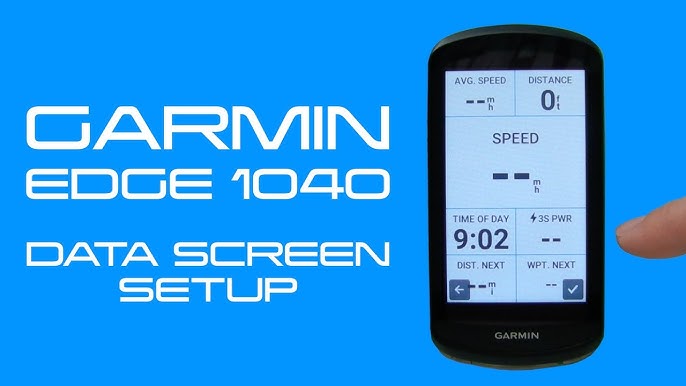
Garmin engineers are aware of the issue and believe they have identified the root cause, but they need user-submitted logs to reproduce and fix it. If you own a Garmin Edge or compatible device, you can help speed up the fix.
How to Capture Diagnostic Logs (Edge 1040 Example)
- Turn on the iC4 and pedal to activate sensors.
- On your Edge 1040, go to Sensors > Add New > Search.
- Wait 30 seconds for the search to fail.
- Press the Power button 5 times quickly to save a log.
- Sync the device to Garmin Connect.
- The log uploads automatically and remains active for 14 days.
Note: You must contact Garmin support and submit logs. Forum posts alone won’t trigger action.
Contact Garmin Support Effectively
Don’t accept “contact the bike manufacturer” as an answer. This is a two-way Bluetooth protocol failure, and Garmin owns the firmware side.
What to Say:
“My external heart rate monitor and Schwinn iC4 worked before the firmware update. After updating to v13.31, the device no longer detects any sensors. I’ve reset the bike, cleared pairings, and tested with other devices. The same HR strap works on older Garmins. This is a regression bug. I’ve submitted diagnostic logs and request a firmware patch.”
Include:
– Watch model and firmware version
– Schwinn iC4 (confirm model)
– HR strap model (Polar H10, Garmin HRM-Dual, etc.)
– App used (Zwift, Garmin Connect, etc.)
The more users who report this with logs, the faster Garmin will prioritize the fix.
Test with Alternative Devices and Apps

Bypass the watch entirely to isolate the problem.
Pair Directly via Smartphone
- Turn on Bluetooth on your iPhone or Android.
- Open Zwift, Kinomap, or iConsole+.
- Pedal the bike to wake sensors.
- Look for:
– “Schwinn IC4” for speed and cadence
– Your HR strap model (e.g., “Polar H10”)
If both appear and transmit data, the iC4 and HR monitor are working. The issue is with your Garmin watch’s firmware.
Use a Bluetooth Scanner App
Download nRF Connect (Android or iOS) to see all nearby BLE signals.
- Pedal the iC4.
- Open nRF Connect and start scanning.
- Look for:
– Schwinn IC4
– Polar H10, HRM-Run, or similar
If the devices appear but won’t connect to your watch, it’s a firmware filtering issue. Your watch is ignoring valid signals.
Replace or Test the Heart Rate Strap
If external pairing fails across all devices, the strap may be dead or faulty.
Common HR Straps Used with iC4:
- Polar H10 (most reliable)
- Garmin HRM-Pro and HRM-Dual
- Wahoo TICKR
- Schwinn-branded Bluetooth straps
How to Test the Strap:
- Wear the strap moistened (dry skin blocks signal).
- Open the Polar Beat or Garmin Connect app.
- Search for heart rate sensors.
- If no signal, try replacing the battery (CR2032 for most models).
Battery Tip: Even straps that seem partially charged can fail under load. Replace the battery if older than 6 months.
Avoid ANT+ Straps
The Schwinn iC4 only supports Bluetooth Low Energy (BLE). ANT+ straps like older Garmin models won’t pair. Check your strap specs before buying.
Prevent Future Connection Issues
Once you regain connectivity, reduce the risk of future dropouts.
Best Practices for Stable Pairing
- Always pair in order: Bike first, then HR monitor.
- Limit active Bluetooth devices. Turn off AirPods, phones, or tablets during rides.
- Keep firmware updated, but cautiously. Wait for user reports before updating Garmin devices.
- Use the iConsole+ app as a control hub. It’s optimized for iC4 and often pairs more reliably than third-party apps.
Store Devices Properly
- Remove the HR strap after use.
- Wipe moisture and store in a dry place.
- Avoid folding the strap, as this damages internal antennas.
When to Contact Schwinn Support
If no device can detect the iC4 sensors, even after resets, contact Schwinn.
Contact Info:
- Website: schwinnfitness.com/support
- Phone: 1-877-808-0808 (US)
- Email: support@schwinnfitness.com
What to Provide:
- Serial number (on rear of bike)
- Console firmware version (in iConsole+ app)
- List of tested devices and results
- Video of the issue (highly effective)
Schwinn may offer a console replacement if Bluetooth hardware is faulty. There is a known issue with loose antenna connections inside the console.
Frequently Asked Questions About Schwinn iC4 Heart Rate Monitor Problems
Why did my Schwinn iC4 heart rate monitor stop working after a Garmin firmware update?
Garmin firmware updates like version 13.31 introduced a regression bug that prevents the watch from pairing with the Schwinn iC4 trainer. Garmin engineers have confirmed awareness of the issue and are working on a fix, but until a patch is released, users must rely on workarounds.
Can I roll back my Garmin firmware to fix the pairing issue?
Yes. At least one user confirmed that rolling back to firmware version 12.35 resolved the pairing problem. However, Garmin does not officially support firmware downgrades, so proceed with caution and back up your data first.
Does the Schwinn iC4 support ANT+ heart rate straps?
No. The Schwinn iC4 only supports Bluetooth Low Energy (BLE) heart rate straps. ANT+ straps like older Garmin models will not pair with the bike. Always verify that your strap uses BLE before purchasing.
How do I submit diagnostic logs to Garmin for this bug?
On a Garmin Edge 1040, turn on the iC4 and pedal to activate sensors. Go to Sensors > Add New > Search. After 30 seconds, press the Power button 5 times rapidly to save a log. Sync the device to Garmin Connect. The log remains active for 14 days, but you must also contact Garmin support directly to open a ticket.
What should I do if Garmin support tells me to contact Schwinn instead?
Push back and open another chat. This is a firmware regression bug on Garmin’s side, not a hardware failure. The same HR strap and bike worked before the update, which proves the issue is on the watch. Insist on opening a support ticket and reference the known issue with the Schwinn iC4 and Bowflex trainers.
Will updating to Garmin beta firmware fix the pairing issue?
It might. One user reported success after updating their Fenix 8 to firmware 17.11 beta. The iC4 reappeared in sensor search. Beta firmware can be unstable, so only use it if you’re comfortable with potential bugs.
Key Takeaways for Fixing Your Schwinn iC4 Heart Rate Monitor
A non-working Schwinn iC4 heart rate monitor is usually not a hardware failure. It’s a Bluetooth pairing issue worsened by Garmin firmware updates. The fastest fix is resetting the bike, clearing old pairings, and testing with a smartphone to confirm the strap works.
If your HR strap works on other devices, contact Garmin support and submit diagnostic logs to accelerate the official fix. Rolling back to firmware 12.35 or trying beta firmware like 17.11 are proven workarounds until Garmin releases a permanent patch.
Stay persistent. The more users demand a fix with logs and support tickets, the sooner this regression gets resolved. Until then, use older devices, beta firmware, or smartphone apps to keep your training on track.