How Accurate Is Apple Fitness Tracker?
If you rely on your Apple Watch to count calories, track heart rate, or log steps, you have likely wondered how accurate is Apple fitness tracker in real-world conditions. The answer depends on which metric you care about most. Heart rate and step tracking perform within a few percentage points of medical-grade equipment, while calorie estimates can swing by 15–30% from your actual energy burn.
This means a workout showing 500 calories could mean anywhere from 350 to 650 calories burned. The good news is that long-term trends remain highly reliable, so the device still offers real value for anyone focused on fitness progress, weight management, or activity consistency.
Heart Rate Tracking Precision
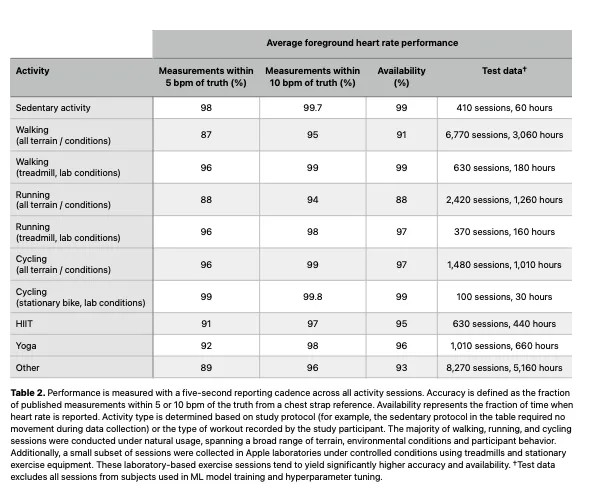
Heart rate is where the Apple Watch performs best, delivering readings that rival clinical equipment under most conditions.
How It Compares to Medical Standards
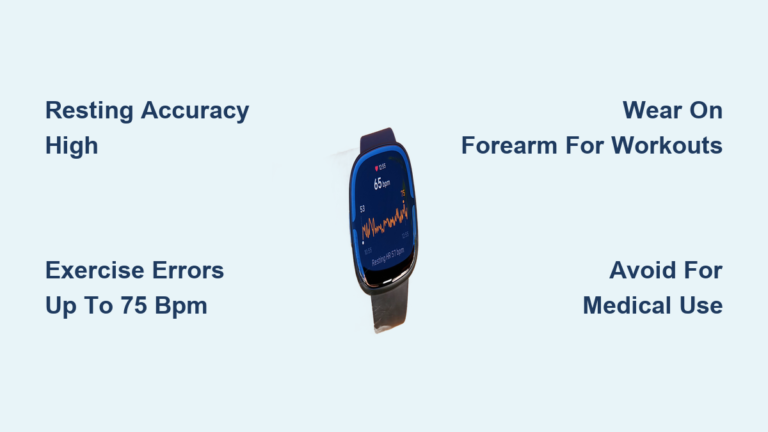
A meta-analysis of 56 academic studies found the Apple Watch measures heart rate with a Mean Absolute Percent Error (MAPE) of just 4.43%. In practical terms, this means readings typically fall within 4–5 beats per minute of an electrocardiogram (ECG) during steady-state cardio like walking or running.
During moderate-intensity exercise, accuracy stays high. However, rapid heart rate changes common in HIIT or sprint intervals can cause brief sensor lag of 2–5 seconds due to built-in smoothing algorithms.
Factors That Affect Readings
Even a precise sensor can produce errors when worn incorrectly:
- Loose fit: Gaps allow light interference and erratic readings
- Excessive wrist movement: Boxing or tennis may disrupt signal quality
- Skin tone and tattoos: Darker pigmentation or inked skin can reduce optical accuracy
- Sweat and hair: Moisture or thick wrist hair blocks sensor contact
Pro Tip: Wear the watch snug against your skin, positioned just above the wrist bone, for optimal optical sensor contact.
Step Count Reliability
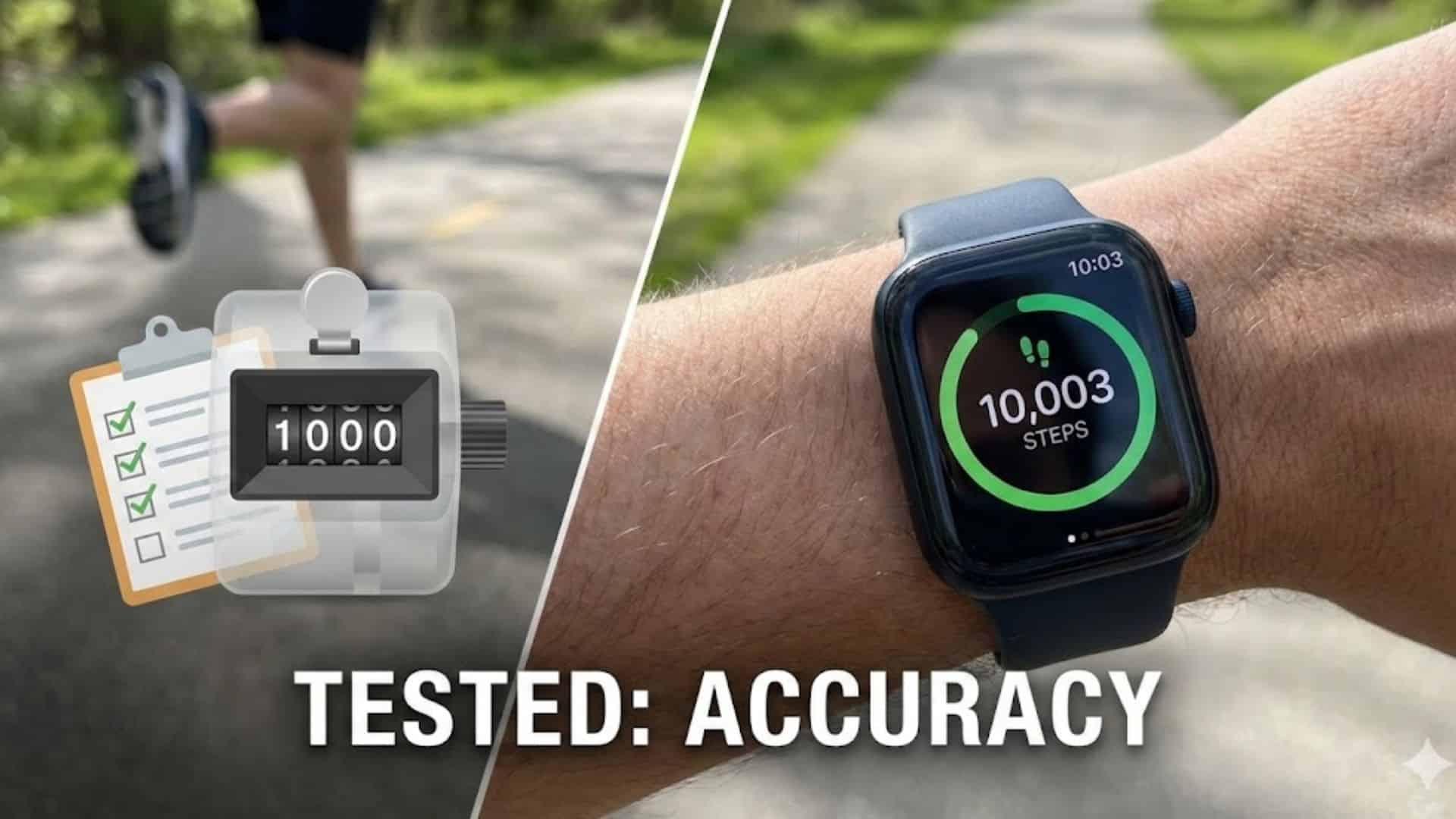
Step tracking is another strong point, with minimal deviation from actual movement in most daily scenarios.
Real-World Accuracy Rates
Research shows a MAPE of 8.17% for step counting. If you take 10,000 steps, the watch typically records between 9,200 and 10,800, a narrow range for trend tracking. Outdoor GPS-assisted walks yield the highest precision, while pushing a stroller, cart, or wheelchair can cause undercounting since arm swing is limited.
Calibration Improves Accuracy
Apple recommends a 20-minute outdoor walk or run with GPS enabled to calibrate stride length and movement patterns. This one-time setup personalizes your gait data.
- Without calibration: Distance may be off by 10–15%
- With calibration: Error drops to 5% or less
Recalibrate every few months or after major fitness changes like weight loss or injury recovery.
Calorie Tracking Limitations
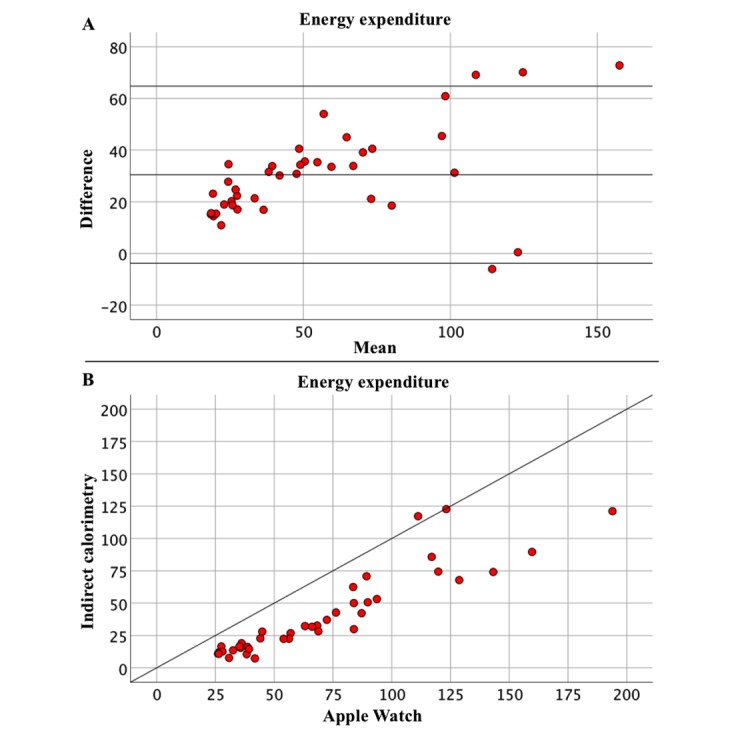
Calorie burn is the least reliable metric on the Apple Watch, and users should treat these numbers as rough estimates rather than exact figures.
Why Calorie Numbers Are Estimates
The watch does not measure energy expenditure directly. Instead, it calculates Total Energy Expenditure (TEE) using a proprietary algorithm that combines:
- Resting Metabolic Rate based on age, sex, height, and weight
- Heart rate elevation during activity
- Motion intensity from accelerometer data
- GPS speed and elevation changes
- Estimated VO₂ Max
Because the system relies on population averages, individual differences in metabolism, muscle mass, or fitness level are not fully captured.
Error Rates and Gender Bias
Studies using indirect calorimetry (the gold standard for measuring energy expenditure) reveal:
- 27–30% average error in active calorie burn
- Up to 30% variance in total daily energy expenditure
- A systematic gender bias: women’s calorie burn is often overestimated, while men’s is underestimated
Expert Note: A 12-week case study tracking 1,300+ meals found that despite daily fluctuations, the trend in calorie deficit correlated closely with actual weight loss (predicted: 24.7 lbs lost; actual: 24.3 lbs). This confirms that long-term trends remain useful even when daily numbers vary.
Activity-Specific Performance Differences
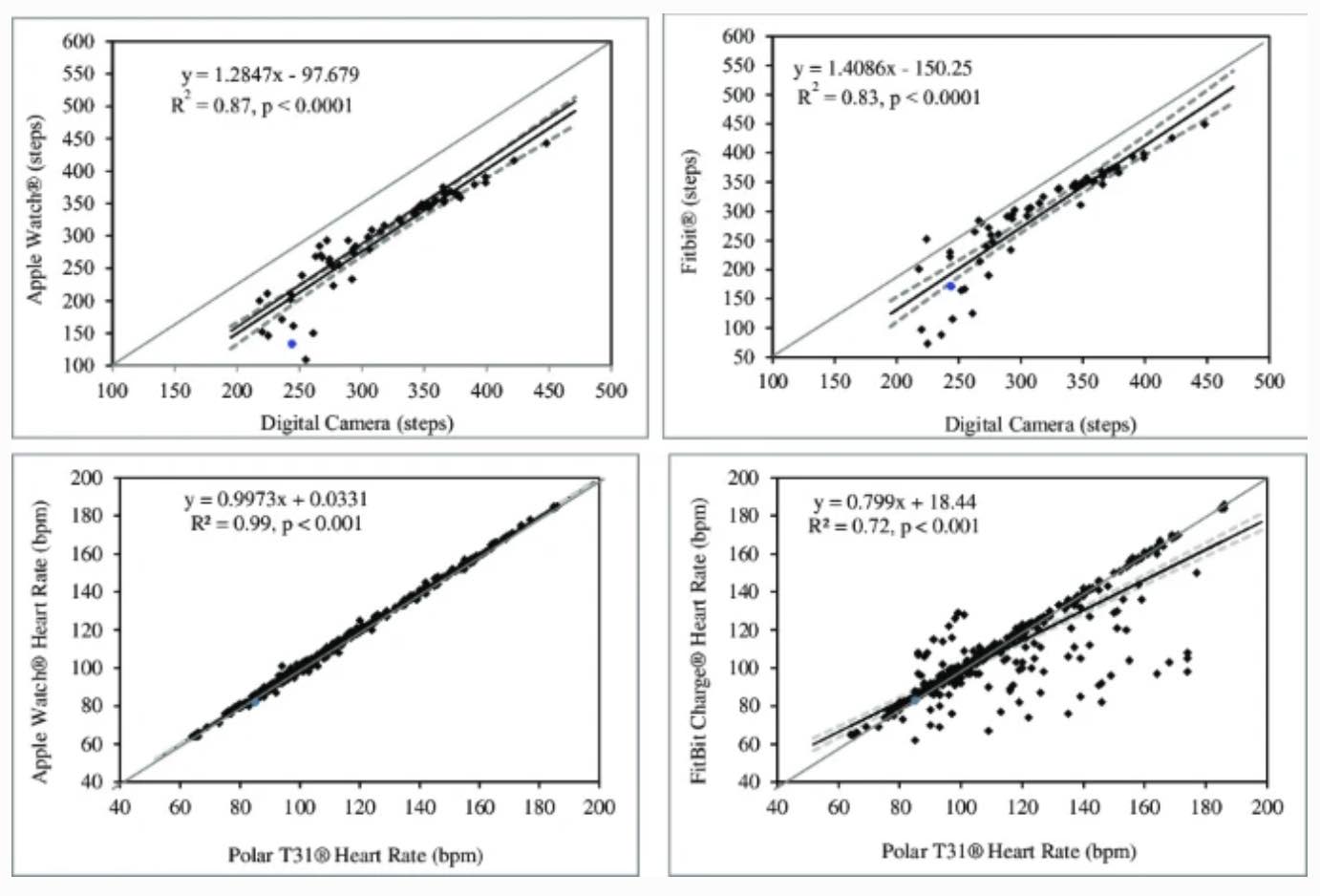
Accuracy varies widely depending on the type of exercise you perform. The watch performs best with predictable, rhythmic movements and struggles with irregular or strength-based efforts.
Most Accurate Activities
Outdoor Running and Walking
GPS and consistent motion produce the most reliable data for heart rate, pace, distance, and calorie estimates, especially after calibration.
Cycling (with iPhone or paired sensor)
When connected to a speed/cadence sensor or iPhone GPS, cycling metrics become highly accurate. Standalone wrist-only tracking is less precise due to limited arm motion.
Least Accurate Activities
Weightlifting and Resistance Training
The watch often underreports calorie burn because heavy lifting doesn’t always spike heart rate significantly, and static holds produce minimal motion data. A 45-minute strength session might show only 150–200 calories burned when actual expenditure could be double that.
HIIT and Interval Workouts
Rapid shifts between rest and max effort confuse smoothing algorithms, causing heart rate to lag behind real-time exertion and total burn to be underestimated.
Sports with Complex Wrist Motion
Tennis, boxing, gymnastics, and rowing involve intense wrist movement unrelated to full-body effort, which creates noise in accelerometer data and inflates step counts.
Swimming
Water affects optical sensors, and stroke mechanics differ from land-based motion. While duration and stroke count are tracked, calorie estimates are among the least reliable.
Factors That Skew Data Accuracy
Even a well-designed device can give misleading results if key variables are not optimized.
Inaccurate Personal Data
The algorithm starts with your profile data: age, sex, height, and weight. If any of these are outdated, your Resting Metabolic Rate (RMR) calculation will be wrong, skewing all calorie estimates.
Action Step: Update your weight in the Health app immediately after any significant change, especially during weight loss or muscle gain phases.
Body Composition Blind Spots
The algorithm uses total body weight rather than body fat percentage or muscle mass. Since muscle burns more calories at rest than fat, two people of the same weight can have very different metabolic rates.
- High muscle mass: Actual RMR exceeds watch estimate, causing underestimation of daily burn
- Higher body fat percentage: Actual RMR falls below watch estimate, causing overestimation
This matters most for bodybuilders, athletes, and users on GLP-1 medications where lean mass preservation affects energy needs.
Poor Wear and Calibration
A loose fit or incorrect placement reduces heart rate accuracy by up to 15%. Skipping calibration also affects step length and pace estimation.
Best practices:
- Wear snugly, just above the wrist bone
- Avoid wearing too high on the forearm
- Recalibrate every few months or after fitness milestones
How to Maximize Accuracy
You cannot eliminate all error, but you can reduce it significantly with smart habits.
Perform Outdoor Calibration
Apple recommends a 20-minute outdoor walk or run at a natural pace with GPS enabled. During this session, the watch learns your stride length, GPS refines distance calculations, and heart rate data is correlated with motion for future predictions. Repeat every 3–6 months.
Choose Correct Workout Types
Selecting “Other” or mislabeling a workout applies a generic algorithm, reducing accuracy. Instead:
- Use Running for outdoor runs
- Use HIIT for interval training
- Use Strength Training for lifting, even if the calorie count seems low
This ensures appropriate data modeling even if absolute numbers remain imperfect.
Track Trends, Not Absolute Numbers
Focus on directional changes rather than exact figures:
- Are your 3-mile runs getting faster?
- Is your average heart rate lower at the same pace?
- Are your Activity Rings closing more easily?
These trends indicate improved fitness even if the calorie counter is off.
Validate with External Tools
For users requiring high accuracy:
- Get a DEXA scan to track fat and muscle changes
- Use indirect calorimetry (RMR test) to benchmark resting burn
- Log food meticulously and compare predicted deficits to actual weight change
This helps calibrate expectations and fine-tune nutrition plans.
Who Should Be Cautious?
While beneficial for most users, some groups face greater risks from relying too heavily on Apple Watch data.
Elite Athletes and Trainers
Highly trained individuals often have lower resting heart rates and unique HR-to-oxygen consumption ratios that fall outside population norms, degrading algorithm accuracy for calorie and fitness level estimates.
People with Medical Conditions
Conditions like hypothyroidism, diabetes, or heart failure alter energy expenditure in ways the watch cannot detect. Medications such as beta-blockers, insulin, and GLP-1 agonists further complicate predictions.
Warning: Never use Apple Watch data to adjust medication or diagnose health issues.
Weight Loss Seekers on Medication
Users on GLP-1 drugs such as semaglutide experience changes in lean mass and appetite. Since the watch does not account for this, RMR predictions may become increasingly inaccurate over time unless weight is updated regularly.
Frequently Asked Questions About Apple Fitness Tracker Accuracy
How accurate is the Apple Watch heart rate monitor compared to a chest strap?
The Apple Watch optical sensor typically falls within 4–5% of ECG measurements during steady-state exercise. Chest straps remain slightly more responsive during rapid heart rate changes, but the watch performs well enough for most fitness applications.
Can I trust Apple Watch calorie counts for weight loss?
Treat calorie numbers as estimates with a 15–30% margin of error. Focus on weekly trends rather than daily totals, and avoid eating back exactly what the watch reports or you may miscalculate your true energy deficit.
Does the Apple Watch overcount or undercount steps?
Step counting has about 8% error, meaning 10,000 actual steps typically register between 9,200 and 10,800. Pushing strollers or wheelchairs can cause undercounting due to restricted arm swing.
Why does my Apple Watch show different calories than other devices?
Different devices use different algorithms and sensor combinations. The Apple Watch relies heavily on heart rate and motion data, while other trackers may emphasize accelerometer input or use different population models for energy estimation.
How often should I calibrate my Apple Watch?
Apple recommends calibrating with a 20-minute outdoor walk or run using GPS every few months, or after significant fitness changes such as weight loss, injury recovery, or major training shifts.
Is the Apple Watch accurate enough for medical decisions?
No. The Apple Watch is a consumer fitness device, not a medical instrument. It should never replace clinical tools or professional medical judgment for diagnosing conditions or adjusting treatments.
Final Verdict on Apple Fitness Tracker Accuracy
So, how accurate is Apple fitness tracker across all metrics? Here is the summary:
| Metric | Accuracy Level | Error Range |
|---|---|---|
| Heart Rate | High | 4–5% |
| Step Count | High | ~8% |
| Distance | Moderate | 5–10% (calibrated) |
| Calories | Low to Moderate | 15–30% |
The Apple Watch is not a medical device, but it is an excellent motivational and trend-tracking tool. Its strength lies in consistency rather than precision.
Bottom line:
- Use it to track progress, stay active, and close your rings
- Rely on heart rate and step trends for meaningful feedback
- Avoid eating back every calorie based on the watch display
- Avoid treating the numbers as scientific truth
When calibrated properly and interpreted wisely, the Apple Fitness system provides actionable insights that support long-term health, even if the digits are not perfect. Start by updating your personal stats in the Health app today and scheduling your next outdoor calibration walk this week.