How to Wear Wahoo Heart Rate Monitor
If you rely on a Wahoo heart rate monitor for training data, even small placement errors can throw off your numbers. The TICKR FIT in particular uses optical sensing that depends on direct skin contact and stable positioning. Many athletes unknowingly wear it too loosely, in the wrong spot, or over clothing, which leads to erratic readings and missed intervals.
The good news is that correct wear is simple once you understand the basics. The TICKR FIT is built for the upper forearm rather than the chest or wrist, and getting the fit right takes only seconds. In this guide, you’ll learn exactly where to place it, how tight the strap should be, and how to avoid the mistakes that compromise accuracy.
Optimal Placement for the TICKR FIT
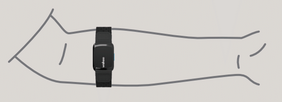
The TICKR FIT is engineered specifically for the upper forearm, not the wrist or chest. This location offers stable contact and consistent blood flow readings during dynamic movement.
Wear on the Inner or Outer Forearm
Place the sensor on either the inside or outside of your upper forearm, about 2–3 inches below the elbow. Both positions work well, but many users prefer the inner forearm for better sensor stability and comfort during arm swings.
Ensure the sensor sits flat against your skin with no gaps. Rotate your arm to check that the device doesn’t shift during motion. If you’re wearing long sleeves, make sure the fabric doesn’t interfere with contact or press unevenly on the sensor.
Avoid Incorrect Locations
Never wear the TICKR FIT on your wrist like a smartwatch, as it won’t provide accurate readings. Similarly, placing it too close to the elbow or shoulder can reduce signal reliability due to lower pulse strength or increased motion interference.
Also, don’t wear it over bulky clothing or loose sleeves. The sensor needs direct, uninterrupted skin contact to function correctly.
Secure Strapping for Reliable Readings

Proper strap tension is just as important as placement. A loose fit causes motion artifacts, while a too-tight band cuts off circulation and causes discomfort.
Adjust the Strap for a Snug Fit
Fasten the strap so the device stays firmly in place without sliding. You should be able to fit one finger underneath the band; any more, and it’s too loose. If two fingers fit easily, re-tighten before starting your workout.
Use the adjustable strap included in the box. Slide the ends through the buckle until the fit feels secure. The neoprene material stretches slightly over time, so check tension regularly, especially after several uses.
Check Stability During Movement
Before starting your session, mimic your exercise motions. Swing your arms if running or simulate pedaling if cycling. Watch for any lifting or shifting of the sensor. If it bounces or rotates, tighten the strap slightly or reposition the unit.
A stable fit prevents false pauses in data and ensures continuous heart rate tracking throughout your workout.
Maximize Accuracy and Comfort
Even with correct placement and fit, small details can affect performance. Optimizing your wear technique leads to smoother workouts and trustworthy metrics.
Keep Skin and Sensor Clean
Sweat, dirt, and lotions create a barrier between the sensor and your skin. Before each use, wipe the optical lens on the back of the TICKR FIT with a dry or slightly damp cloth. Also, clean the area of your forearm where the sensor rests.
Dry skin improves adhesion and reduces slippage. Avoid applying perfumes, sunscreens, or oils directly under the sensor zone.
Wear During Different Activities
The TICKR FIT works across multiple sports, but each requires slight attention to fit:
- Running: Place on inner forearm; ensure no bounce during stride.
- Cycling: Outer forearm may feel less restrictive with tight jersey sleeves.
- Weight Training: Check that straps don’t dig in during overhead lifts.
- HIIT Workouts: Recheck fit mid-session, as sweat can loosen the band.
Regardless of activity, always reconfirm placement at the start of your workout.
Troubleshooting Common Issues
Even experienced users run into problems. These quick fixes resolve the most frequent complaints.
Fix Intermittent Signal Loss
If your heart rate cuts out during exercise:
– Retighten the strap, since motion often loosens it over time.
– Reposition the sensor to make sure it hasn’t rotated away from the pulse point.
– Avoid reflective surfaces, as bright arm sleeves or metallic fabrics can interfere with the optical sensor.
Also, ensure your fitness app or watch is paired correctly and hasn’t dropped the Bluetooth connection.
Prevent Skin Irritation
Some users report redness or chafing after extended wear. To prevent this:
– Don’t wear the band for hours post-workout.
– Wash the strap with mild soap and water after sweaty sessions.
– Let skin breathe by removing the device immediately after exercise.
If irritation persists, try wearing it on the opposite side of your forearm or alternate with a chest-based monitor.
Compare Placement Options

While the forearm is standard for the TICKR FIT, understanding why other spots don’t work helps reinforce best practices.
Why Not the Wrist?
Unlike wrist-based watches, the TICKR FIT uses high-frequency sampling designed for the larger arteries in the upper forearm. The wrist has smaller vessels and more variable flow during movement, leading to lag and inaccuracies.
Additionally, the TICKR FIT lacks the adaptive algorithms found in premium smartwatches that compensate for wrist motion.
Why Not the Chest?
Traditional chest straps measure electrical signals directly from the heart. They’re highly accurate but can feel restrictive. The TICKR FIT offers a strapless forearm alternative rather than a chest replacement.
Choose the TICKR FIT for comfort and convenience. Choose a chest strap for maximum precision in interval training or VO2 max testing.
Maintain Your Device Long-Term
Proper care extends the life of your TICKR FIT and keeps readings reliable over time.
Clean After Every Workout
Wipe down the sensor and strap with a damp cloth. Remove sweat buildup that could degrade the neoprene or corrode contacts. Let the device air dry; never leave it in direct sunlight or near heat sources.
Avoid submerging the unit in water, even though it’s sweat-resistant. Rinse only if absolutely necessary, and never machine wash the strap.
Store Properly
Keep the TICKR FIT in a cool, dry place. Don’t leave it bunched up or under heavy objects, which can deform the strap or damage the sensor housing.
Unpair it from devices when not in use to preserve battery life.
Frequently Asked Questions About the Wahoo Heart Rate Monitor
Where exactly should I wear the TICKR FIT on my arm?
Wear it on the inside or outside of your upper forearm, about 2–3 inches below the elbow. This placement ensures stable contact and accurate optical readings during exercise.
How tight should the Wahoo heart rate monitor strap be?
The strap should be snug enough to keep the sensor flat against your skin without sliding. You should be able to fit one finger underneath; two fingers means it’s too loose.
Can I wear the TICKR FIT on my wrist?
No. The TICKR FIT is designed specifically for the upper forearm. Wearing it on the wrist will result in inaccurate readings due to smaller blood vessels and more motion interference.
Do I need to wear it directly on bare skin?
Yes. The optical sensor requires direct skin contact to detect blood flow accurately. Wearing it over clothing or loose sleeves will disrupt the signal.
How do I prevent the strap from slipping during workouts?
Keep both your skin and the sensor clean and dry before each session. Check the strap tension regularly, especially during high-sweat activities like HIIT or running.
Is the TICKR FIT as accurate as a chest strap?
Chest straps generally offer slightly higher precision because they measure electrical signals. However, the TICKR FIT provides reliable accuracy for most training scenarios while offering greater comfort and convenience.
Key Takeaways for Wearing Your Wahoo Heart Rate Monitor
Getting the most from your Wahoo heart rate monitor comes down to three essentials: correct placement, proper strap tension, and clean contact. Always wear the TICKR FIT on the upper forearm, keep it snug with room for one finger underneath, and ensure the sensor sits flat on bare skin.
Before your next workout, take 30 seconds to check your fit. A quick adjustment now prevents inaccurate data later and helps you train with confidence.