How to Tighten Garmin Heart Rate Monitor
A loose Garmin heart rate monitor can lead to inaccurate readings, discomfort during workouts, or even damage to the strap over time. If you’re wondering how to tighten Garmin heart rate monitor properly, you’re not alone. Many users struggle with fit, especially after repeated use or washing. A secure fit ensures consistent contact with your skin, which is essential for accurate heart rate tracking during running, cycling, or gym sessions.
The good news: tightening your Garmin HRM strap is simple and doesn’t require tools. Whether you’re using the HRM-Dual, HRM-Pro, or any other Garmin chest strap model, the adjustment process is nearly identical across devices. In this guide, you’ll learn how to properly tighten the strap, maintain its elasticity, and avoid common fitting mistakes that could affect performance.
Adjust the Strap Length

Slide the Buckle to Fit
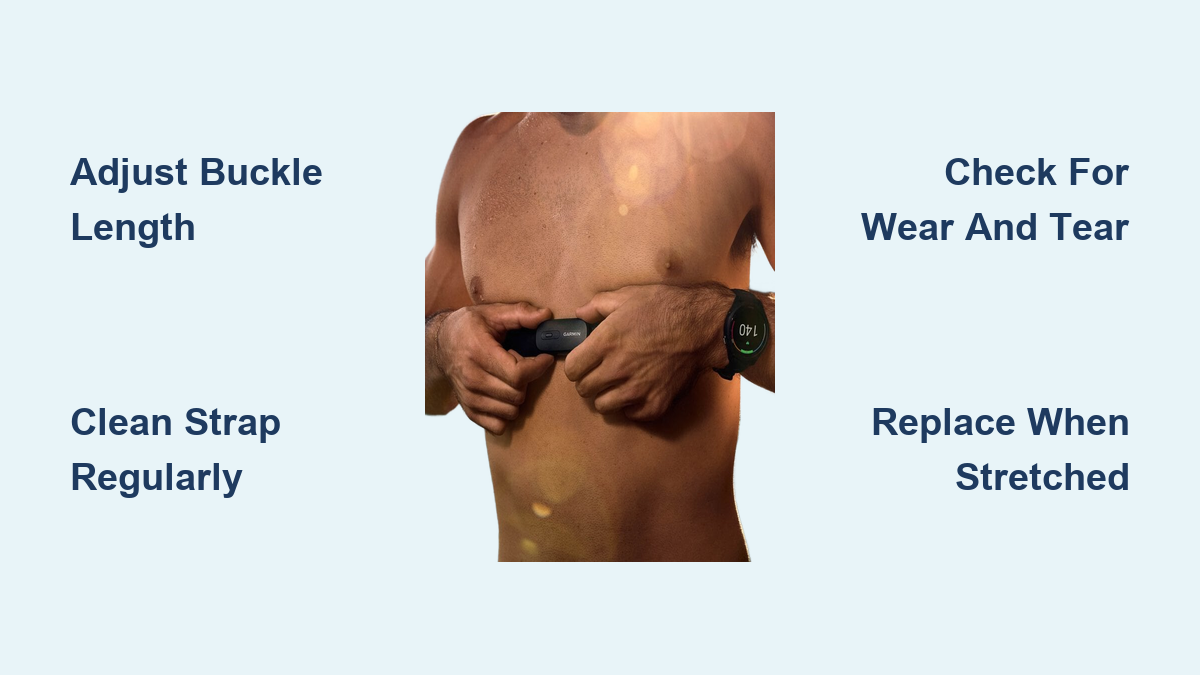
To tighten your Garmin heart rate monitor, start by adjusting the strap length using the plastic buckle. Pull the free end of the band through the buckle to shorten it. The ideal fit should feel snug against your chest. It should be tight enough to stay in place during movement, but not so tight that it restricts breathing.
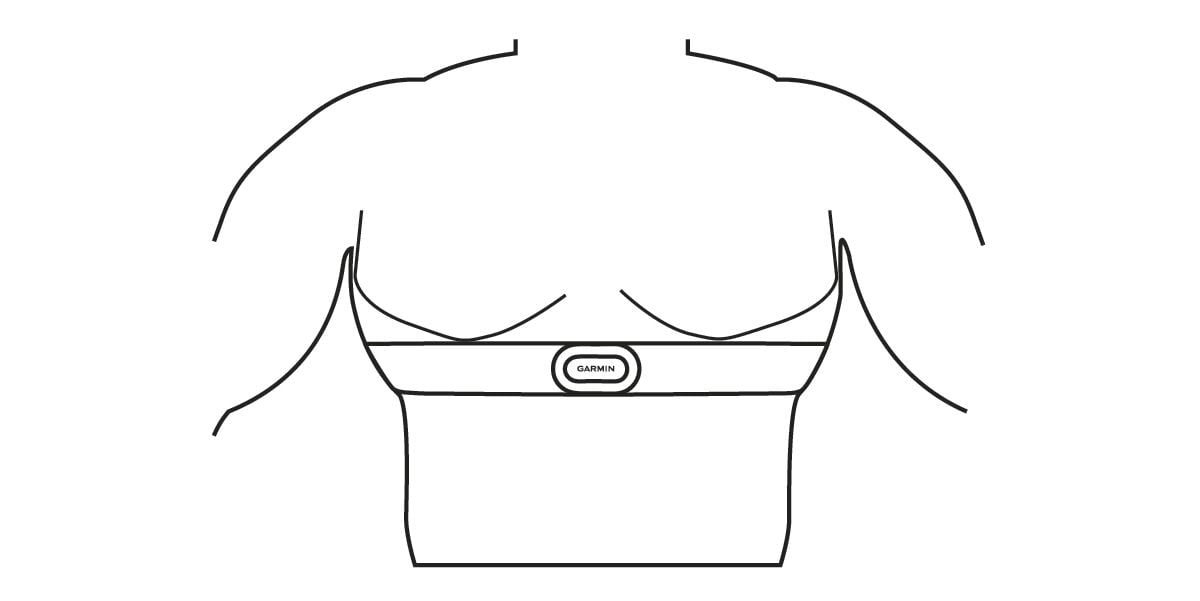
Make sure the sensor module sits just below your pectoral muscles, centered and level. This positioning ensures optimal electrical signal detection from your heartbeat.
Test for Proper Tension
After tightening, do a quick movement test. Jump, twist, or simulate running motions. If the strap bounces or shifts, tighten it slightly more. You should feel minimal movement, but no discomfort. Remember: a properly tightened strap stays in place without pinching.
Pro Tip: If the strap feels too tight even at the shortest setting, the band may have stretched over time and need replacement.
Clean Before Adjusting
Remove Sweat and Grime
Dirt, sweat, and detergent buildup can degrade the elasticity of the strap over time. Before tightening or wearing, clean the band with mild soap and water. Gently scrub the fabric and rinse thoroughly. Let it air dry. Never use a dryer.
A clean strap regains some of its original flexibility, making it easier to achieve a secure fit without over-tightening.
Check for Wear and Tear
Inspect the fabric for fraying, thinning, or permanent stretching. Also examine the plastic buckle and sensor connection points. If the material no longer snaps back when stretched, it’s time to replace the strap. Even if fully tightened, worn bands won’t hold securely.
Warning: Using a damaged strap can result in poor data accuracy and skin irritation.
Use the Right Size Guide
Measure Your Chest
Garmin heart rate monitor straps are designed to fit a range of chest sizes. Most models fit chests from about 24 to 48 inches (60–122 cm). To ensure proper fit:
- Wrap a soft measuring tape around your chest, just below the pectorals.
- Note the measurement.
- Compare it to Garmin’s sizing chart if available for your model.
If you’re near the upper limit of the strap’s range, consider purchasing an extended-length replacement band.
Know When to Upgrade
Some Garmin models, like the HRM-Pro, offer compatibility with longer straps sold separately. If the standard strap won’t tighten enough for your build, check Garmin’s website for extended versions or third-party compatible bands designed for larger frames.
Prevent Future Loosening
Hand Wash After Every Use
To preserve elasticity, always hand wash your strap after intense workouts. Machine washing, even on gentle cycles, can break down the spandex and nylon fibers faster, leading to premature loosening.
Avoid fabric softeners, which coat fibers and reduce breathability and stretch recovery.
Store It Flat and Dry
Never leave your heart rate monitor crumpled in a gym bag. Instead, unclip the sensor and lay the strap flat or loosely coiled in a dry area. This helps maintain its shape and tension over time.
Expert Note: Heat and humidity accelerate material degradation. Store away from direct sunlight or hot environments.
Troubleshoot Common Fit Issues
Strap Slips During Exercise
If your Garmin HRM slips even when tightened:
- Recheck positioning: It must sit level across your back and under your chest.
- Moisturizers or lotions on your skin can reduce grip, so wipe your chest before wearing.
- Consider wearing the strap over a thin, moisture-wicking base layer for added grip, though this may slightly reduce signal accuracy.
Sensor Loses Connection
A loose strap can cause intermittent Bluetooth or ANT+ disconnections. If tightening doesn’t resolve connectivity issues:
- Ensure the sensor is snapped securely into the strap.
- Replace the battery if applicable (e.g., HRM-Pro uses a CR2032).
- Reset the pairing on your Garmin watch or app.
Replace When Necessary
Signs It’s Time for a New Strap
Even with proper care, Garmin heart rate monitor straps wear out. Common signs include:
- Persistent looseness despite full tightening
- Fabric feels thin or rough
- Elasticity doesn’t rebound
- Red marks or irritation after use
Most users replace their straps every 12–18 months with regular use.
Install a New Strap Correctly
When you get a replacement band:
- Thread the end through the buckle.
- Pull to create a snug fit around your chest.
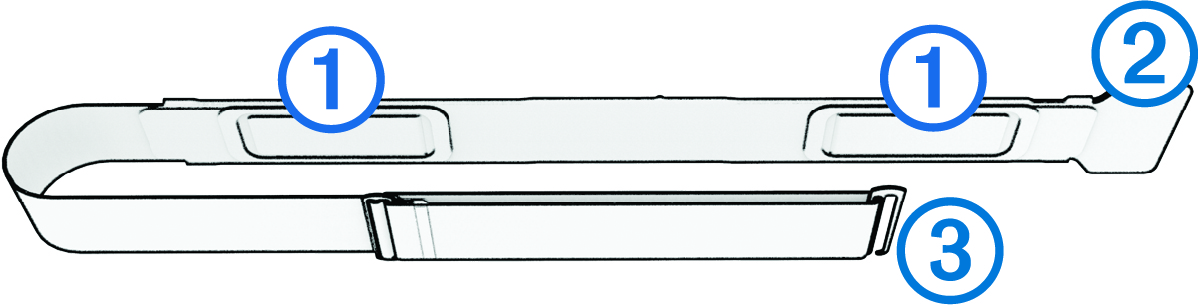
- Snap the sensor module into the grooves until it clicks.
- Test fit before your next workout.
Note: Always use genuine Garmin or approved replacement parts to ensure compatibility and accuracy.
Optimize Wear for Accuracy

Position the Sensor Centered
Even a perfectly tightened strap delivers poor data if misplaced. The sensor module must be centered on your sternum, not riding up on one side. Misalignment distorts the electrical signal from your heart.
Wet the Sensors if Needed
For better conductivity, especially in dry conditions or with hairy chests, lightly moisten the two metal electrodes on the back of the sensor. This helps establish a strong connection without needing to over-tighten the strap.
Caution: Don’t use gels or conductive creams unless specified by Garmin.
Frequently Asked Questions About Tightening Garmin Heart Rate Monitors
How tight should a Garmin heart rate monitor be?
The strap should feel snug but not restrictive. You want enough tension to keep the sensor in contact with your skin during movement, but not so tight that it causes discomfort or restricts breathing.
Why does my Garmin HRM keep slipping during workouts?
Slipping usually means the strap is stretched out, positioned incorrectly, or your skin is too dry or moisturized. Try moistening the sensor electrodes, repositioning the strap below your pectorals, or replacing an old band.
Can I make my Garmin chest strap tighter if it’s already at the shortest setting?
If the strap is fully shortened but still loose, the elastic has likely worn out. At that point, replacing the strap is the best solution. Some Garmin models also offer extended-length replacement bands for larger chest sizes.
How often should I replace my Garmin heart rate monitor strap?
With regular use, most straps last 12–18 months. Replace sooner if you notice persistent looseness, fabric thinning, or skin irritation after workouts.
Does wetting the sensor improve accuracy?
Yes. Lightly moistening the electrode pads improves conductivity, especially in dry environments or for users with dry or hairy skin. This can reduce the need to over-tighten the strap.
Key Takeaways for Tightening Your Garmin Heart Rate Monitor
Learning how to tighten Garmin heart rate monitor straps correctly comes down to three essentials: proper positioning, appropriate tension, and consistent maintenance. Always center the sensor below your pectorals, tighten until snug without discomfort, and clean the strap regularly to preserve elasticity.
If your strap no longer holds tension even after adjustment, replace it with a genuine Garmin band. A well-fitted heart rate monitor delivers accurate data, feels comfortable during exercise, and lasts longer with proper care. Start by checking your current fit today, and make strap maintenance part of your post-workout routine.