How to Use Cardio Wave Machine
If traditional cardio machines leave you bored or your joints aching, the Technogym Cardio Wave offers a refreshing alternative. This unique equipment delivers a high-calorie, low-impact full-body workout through a three-plane motion that combines extension, abduction, and external rotation. Unlike standard ellipticals, the Cardio Wave creates a rhythmic, dance-like movement that engages your glutes, core stabilizers, and lower limbs simultaneously. Many users find it especially engaging when synced to music, turning exercise into an enjoyable experience rather than a chore.
This guide walks you through everything from setup and safe mounting to mastering the movement rhythm, using console features, and maintaining your machine. You’ll also discover common mistakes to avoid, workout protocols for different goals, and basic troubleshooting tips. By the end, you’ll know exactly how to use the Cardio Wave machine for safer, more effective workouts.
Prepare Your Space and Machine
Proper setup ensures safety, stability, and long-term performance before your first session.
Check Clearance and Flooring
The machine measures 63 inches long, 30 inches wide, and 59 inches high, so you need at least 60 inches of clearance around it for safe access. Place it on a level surface using a 3’x6.5′ PVC mat or rubber gym flooring to protect your floor and reduce vibration. Avoid carpeted or uneven surfaces, which can cause instability during the multidimensional motion.
Verify Weight and Stability
With a 350 lb user weight limit, confirm the machine supports your body weight before use. The unit itself weighs 290 lbs, so avoid moving it without professional help. Once positioned, adjust the leveling feet until the machine sits completely flat with no wobbling. An unlevel machine disrupts your rhythm and strains internal components over time.
Perform Daily Pre-Use Checks
Even if you don’t use the machine daily, inspect it before each session:
– Clear debris from ramps and wheels
– Check cable tension, since loose or overly tight cables affect motion quality
– Wipe down grips and console to prevent sweat buildup
– Ensure proper lubrication on moving tracks per manufacturer schedule
Skipping these checks may void warranty coverage for related repairs, as maintenance is considered user responsibility.
Mount the Machine Safely
Improper mounting can lead to imbalance or falls, especially for first-time users unfamiliar with the three-plane motion.
Power On and Secure Hand Position
Press the console power button to activate the Unity or Active Wellness TV system. Grip both handles firmly before stepping on, keeping your arms relaxed without locking your elbows. A relaxed grip allows better core engagement throughout your workout.
Step On One Foot at a Time
Lift one foot and place it fully on the platform, ensuring your heel and arch are centered. Repeat with the other foot. Never jump or step on both feet simultaneously because the multidimensional motion requires controlled initiation. Stable footing prevents slips and helps you feel the machine’s rhythm.
Start With Slow, Controlled Motion
Begin with small, slow movements to feel the natural intrinsic beat of the machine. Focus on pushing through your heels and outer edges to engage glutes and hips. Let your body adapt to the three-plane rhythm before attempting to increase speed or intensity.
Master the 3-Plane Movement Pattern
The Cardio Wave’s effectiveness comes from its unique combination of motion planes. Getting this right maximizes muscle engagement and calorie burn.
Drive Through Heels for Extension
Push backward and forward through your heels to activate hamstrings and glutes rather than relying on quads alone. Keep your knees slightly bent and avoid locking them at any point during the movement.
Push Outward for Abduction
Simultaneously press your legs outward against the machine’s resistance. This targets the gluteus medius and hip abductors, muscles often underused in standard cardio workouts. The outward push is key to the machine’s signature muscle-sculpting benefits.
Rotate Slightly for External Rotation
Allow a subtle external rotation of your hips and feet, with toes pointing slightly outward. This completes the three-plane motion and enhances core activation throughout each repetition.
Maintain Upright Posture and Core Engagement
Stand tall with shoulders back and core tight. A weak core leads to swaying or over-gripping the handles. Your torso should remain stable while your legs and hips do the work.
Sync to the Intrinsic Rhythm

One of the Cardio Wave’s standout features is its natural, beat-like motion, which pairs perfectly with music.
Match Cadence to Music Tempo
Use the console’s audio output or media device input to play rhythmic music. 110–130 BPM works well for most users. Let the beat guide your stride naturally. Users report higher endurance and enjoyment when moving in time with music.
Use Pre-Set Programs for Variety
Select from 15 built-in programs on the touchscreen to vary intensity throughout your sessions. Try interval settings that alternate between slow rhythm and fast bursts to boost calorie burn and prevent plateaus.
Focus on Coordination, Not Speed
Don’t rush the movement. The goal is full-body coordination, not how fast you can move. Poor form reduces effectiveness and increases injury risk, so prioritize quality over speed.
Use Console and Entertainment Features
The Cardio Wave isn’t just a workout tool. It’s an immersive experience designed to keep you engaged.
Access Media and TV
Connect your iPod or media device to the console for video playback. Watching content helps pass time during longer sessions, especially during rehabilitation or endurance training.
Monitor Workout Data
The console displays time, calories, programs, and heart rate when using a compatible monitor. Use this feedback to track progress and stay within your target training zones.
Reset or Troubleshoot Console Errors
If the screen freezes or shows an error:
– Perform a console reset by powering off, waiting 30 seconds, then restarting
– If issues persist, contact service since software problems are covered under warranty
Dismount With Control
Ending your session safely is just as important as starting it correctly.
Gradually Slow the Motion
Reduce your stride speed and amplitude over 15–30 seconds. Let the machine reach a near-stop before stepping off to prevent dizziness or loss of balance.
Step Off One Foot at a Time
Hold the handles, lift one foot off the platform, then the other. Avoid jumping or stepping off at full speed, which can strain your joints.
Clean and Store Properly
Wipe down hand grips, console, and foot platforms with a dry or slightly damp cloth. Removing sweat and dust prevents corrosion and maintains hygiene for your next session.
Optimize for Your Fitness Goal
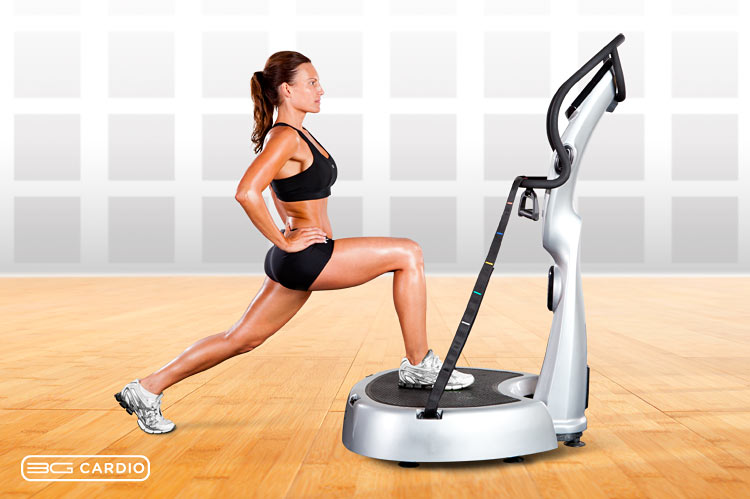
Tailor your Cardio Wave use to your specific needs for maximum results.
For Rehabilitation and Mobility
Use low resistance and slow rhythm to rebuild joint stability and gait patterns. The non-impact design protects knees and hips, making it ideal for post-injury recovery or active aging populations.
For Glute and Core Strengthening
Focus on heel drive and abduction throughout each repetition. Squeeze glutes with each push and keep your core braced. Perform 3–4 sets of 2-minute intervals with 1-minute rest periods for optimal muscle development.
For High-Intensity Calorie Burn
Set a high-tempo playlist and use interval programs. Alternate 1 minute of fast, coordinated motion with 30 seconds of recovery. Expect significant calorie expenditure due to the full-body engagement required.
Avoid Common Mistakes

Even small errors can reduce benefits or cause unnecessary wear on the machine.
Don’t Over-Grip the Handles
Leaning on handles shifts load from your legs to your arms and weakens core engagement. Use them only for balance, not support.
Don’t Rush the Rhythm
Forcing speed disrupts the natural wave motion and reduces effectiveness. Stay in sync with the machine, not against it.
Don’t Skip Maintenance
Ignoring tension checks, leveling, and cleaning leads to mechanical wear over time. These tasks are user-responsible and labor costs are not covered under standard warranty terms.
Troubleshoot Basic Issues
Most minor problems can be resolved quickly without professional service.
Machine Feels Loose or Wobbly
Check leveling feet and floor surface first. Then inspect cable tension and adjust if needed with a wrench.
Unusual Noise or Vibration
Look for debris in ramps or wheels and clean thoroughly. If noise persists, it may indicate a bearing or pulley issue, which is covered under warranty.
No Power or Console Errors
Ensure the machine is plugged in properly. Try a console reset by powering off and restarting. If error screens remain, contact service since electronic issues are warranty-covered.
Maintain Long-Term Performance
Regular care extends the life of your Cardio Wave and protects your investment.
Follow a Weekly Maintenance Routine
- Clean all contact points thoroughly
- Inspect cables and moving parts for wear
- Re-level if the floor shifts
- Lubricate tracks as recommended by the manufacturer
Schedule Professional Servicing
Even with diligent care, mechanical parts wear over time. Remanufactured units come with a 1-year parts and labor warranty, extendable up to 5 years. Use authorized technicians for repairs to maintain coverage.
Keep Records and Warranty Info
Save purchase receipts, warranty documents, and service logs in a safe place. Warranty is non-transferable and requires proof of ownership for any claims.
Frequently Asked Questions About the Cardio Wave Machine
Is the Cardio Wave machine good for beginners?
Yes, the Cardio Wave suits all fitness levels, including beginners. Start with slow, controlled movements to learn the three-plane rhythm before increasing intensity. The non-impact design also makes it safer than running for those new to cardio exercise.
How many calories does the Cardio Wave burn?
The Cardio Wave is designed for high-calorie expenditure through full-body coordination. Exact calorie burn varies based on intensity, duration, and user weight, but the three-plane motion typically burns more calories than traditional ellipticals due to greater muscle engagement.
Can I use the Cardio Wave after an injury?
The machine is frequently recommended for rehabilitation because it’s non-impacting and promotes natural movement patterns. However, always get medical clearance from your doctor or physical therapist before starting any post-injury exercise program.
What is the maximum user weight for the Cardio Wave?
The Cardio Wave 700e has a 350 lb maximum user weight limit. Users exceeding this limit should not operate the machine to prevent structural failure or injury.
How do I sync music to the Cardio Wave?
Connect your iPod or compatible media device to the console’s audio input. Choose rhythmic music between 110–130 BPM to match the machine’s intrinsic beat. Many users report better endurance and enjoyment when training in sync with music.
What maintenance does the Cardio Wave require?
Users are responsible for daily cleaning, cable tension checks, leveling adjustments, and track lubrication. These standard maintenance tasks are not covered under labor warranty, so performing them regularly prevents costly repairs and keeps the machine functioning properly.
Key Takeaways for Mastering Your Cardio Wave Workouts
Learning how to use the Cardio Wave machine properly transforms your cardio routine from mundane to engaging. Focus on three essentials: master the three-plane movement by driving through your heels, pushing outward, and allowing slight external rotation; sync your rhythm to music between 110–130 BPM for better endurance; and perform regular maintenance including cleaning, tension checks, and leveling to protect your investment.
Start with slow, controlled movements to build coordination before increasing speed. Whether you’re rehabilitating an injury, strengthening your glutes, or burning maximum calories, the Cardio Wave adapts to your goals. Step onto the platform today, sync to the beat, and experience a cardio workout that actually feels good.