How to Reset Polar Heart Rate Monitor
Is your Polar heart rate monitor giving erratic readings, refusing to pair, or acting up after a battery change? You’re not alone. Many users face connectivity glitches with their Polar H10, H9, and legacy H7 sensors, especially after firmware updates or extended use. The good news is that a proper reset can fix most pairing failures, inaccurate data, and sync problems. Knowing how to reset a Polar heart rate monitor correctly saves time and frustration.
This guide walks you through both software and hardware reset methods for every major model. You’ll learn step-by-step procedures using the Polar Flow app, manual hardware resets, and critical firmware details that prevent unexpected pairing loss.
Software Reset: Use Polar Flow App for H10 and H9
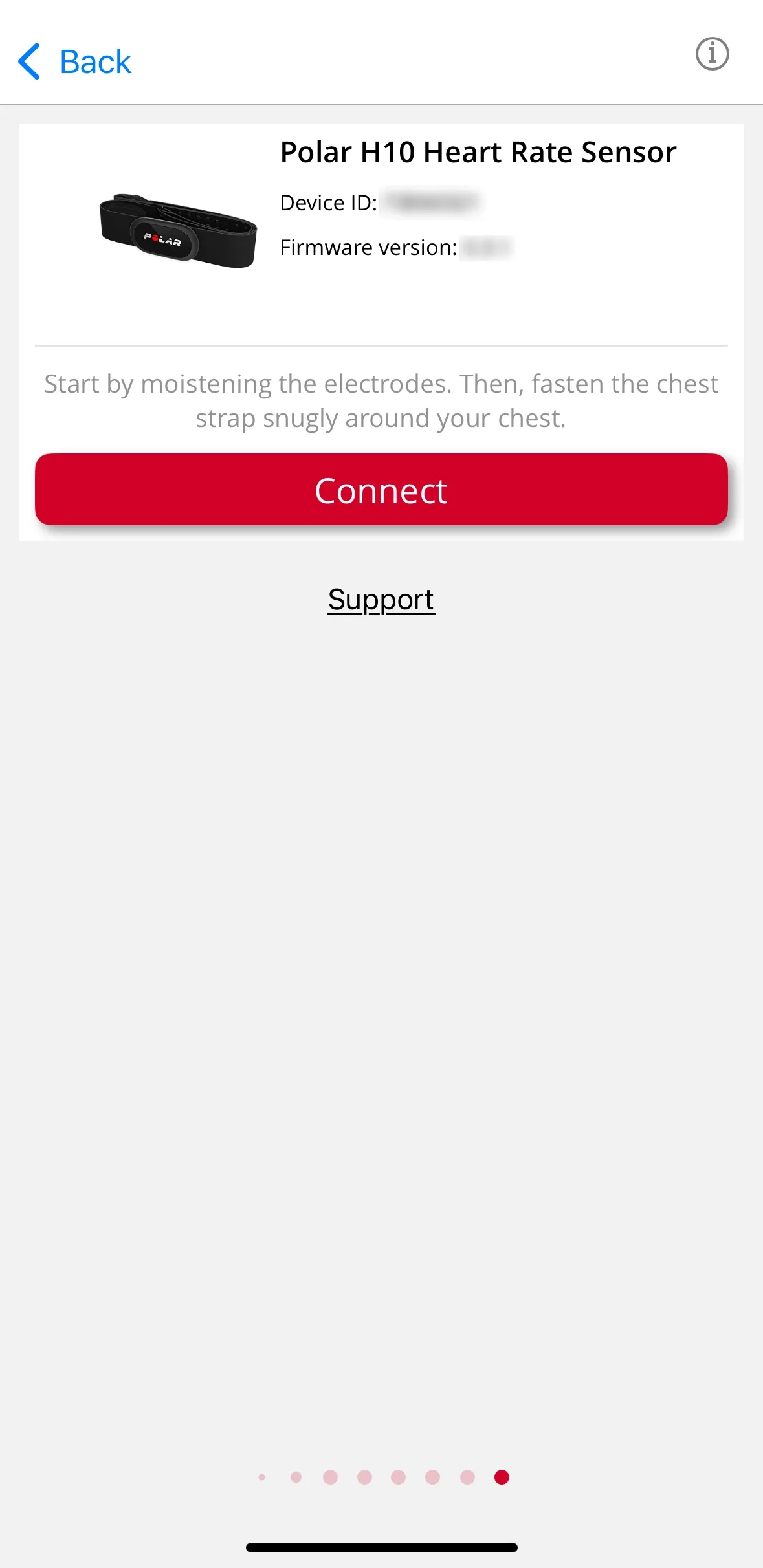
This method works best when your sensor still connects to your phone and responds normally. It’s faster and more guided than the manual approach.
Activate the Sensor Before Opening the App
Wear the heart rate strap so the sensor makes skin contact. This automatically powers on the device. Without activation, the app won’t detect your sensor. Lightly moistening the electrodes improves conductivity and ensures reliable startup.
Navigate to the Devices Menu in Polar Flow
Open the Polar Flow app on your smartphone. Tap the menu icon (three lines) and select Devices. If you have multiple Polar devices linked, swipe left or right until you find your specific heart rate monitor. Confirm you’re selecting “Polar H10” or “Polar H9” before proceeding.
Connect and Trigger the Factory Reset
Tap Connect to establish a Bluetooth link with your sensor. Once connected, scroll to the bottom of the device settings screen and tap Factory reset. Confirm the action when prompted. The sensor immediately erases all stored data and returns to factory settings. You’ll need to re-pair it with your devices afterward.
Hardware Reset: Manual Battery Method for All Models

Use this approach when the sensor won’t connect to the app, you’re working with an older H7, or the device appears completely unresponsive.
Remove the Module and Battery
Take the transmitter module out of the chest strap or hand-grip unit. Open the battery compartment and carefully remove the coin-cell battery. Set it aside for now.
Press the Metal Snaps for 10 Seconds
Locate the two metal snap contacts on the back of the module. These are the same points that connect to the textile strap’s electrodes. Using your fingers, press and hold both snaps simultaneously for at least 10 seconds. This discharges residual power from internal capacitors and forces a full hardware reset.
Wait 30 Seconds Before Reassembling
After releasing the snaps, wait 30 seconds with the battery still removed. This stabilizes the circuit and ensures complete power depletion. Skipping this wait often results in an incomplete reset.
Reinsert the Battery and Re-pair
Put the battery back in, observing correct polarity. Reattach the module to the strap. Activate the sensor by wearing it or wetting the electrodes, then attempt pairing with your phone, watch, or gym equipment.
Firmware Rules: When Re-Pairing Is Mandatory

Your firmware version determines whether your sensor auto-reconnects after a reset or disappears entirely from your device list.
Check H10 Firmware: Version 3.3.1 Threshold
If your Polar H10 runs firmware older than version 3.3.1, any reset, battery swap, or firmware update requires manual re-pairing. Without this step, the sensor won’t connect to any device. Always verify your firmware version in the Polar Flow app before changing the battery or performing a reset.
Confirm H9 Firmware: Version 1.2.1 Minimum
Polar H9 units with firmware below v1.2.1 lose all pairing data after a reset or battery replacement. You must manually re-pair them using Bluetooth or ANT+. Devices updated to v1.2.1 or later may auto-reconnect, but verifying the connection is still recommended.
Model Compatibility: Which Reset Method to Use

Not all reset methods work the same across devices. Choosing the right one prevents wasted effort.
H10 and H9 Support Both Methods
Both models support software reset via Polar Flow and manual hardware reset. Use the app method when possible since it’s faster and guided. Fall back to hardware reset only if the sensor is unresponsive.
H7 and Go Wireless Require Hardware Reset
The H7 and older Go Wireless transmitters don’t support app-based resets. You must use the hardware method: remove the battery, press the snaps for 10 seconds, wait 30 seconds, then re-pair. This protocol works universally across all detachable Polar transmitter modules.
Troubleshooting Common Reset Failures

Even with correct steps, issues can arise. Here’s how to address them quickly.
No Lights or Vibration After Reset
If the sensor shows no signs of life, check the following:
- Ensure the battery is inserted with correct polarity (positive side up)
- Clean the battery contacts with a dry cloth
- Try activating with damp electrodes since dry skin may prevent startup
Sensor Won’t Reconnect Post-Reset
If pairing fails after a successful reset, try these steps:
- Delete the old device entry from your phone’s Bluetooth settings
- Restart your smartphone or watch
- Forget the device in Polar Flow and re-add it
- Confirm firmware meets minimum thresholds (v3.3.1 for H10, v1.2.1 for H9)
Inconsistent Readings After Reset
If heart rate data remains erratic, inspect the strap itself:
- Check for worn or cracked electrode areas
- Replace the strap if fabric is degraded
- Avoid using with excessive chest hair that interferes with skin contact
When to Reset Your Polar Monitor
Timing your reset correctly prevents unnecessary downtime and protects your data.
Before Selling or Gifting Your Device
Perform a factory reset to erase all personal data stored in the sensor’s memory. This protects your privacy and gives the new owner a clean setup.
After Replacing the Battery
On older firmware versions, battery swaps trigger pairing loss. Always reset and re-pair if your device won’t connect after a battery replacement.
Fixing Signal Dropouts or Sync Issues
Frequent disconnects during workouts often stem from corrupted pairing tables. A reset clears these issues and refreshes Bluetooth and ANT+ communication.
Pro Tips for Long-Term Reliability

Keep your Polar heart rate monitor working smoothly with these maintenance practices.
Update Firmware Regularly
Stay on H10 v3.3.1 or higher, or H9 v1.2.1 or higher, to benefit from auto-reconnection features. Check for updates in the Polar Flow app monthly.
Clean Contacts After Every Use
Wipe the metal snaps and battery compartment with a dry, lint-free cloth. Sweat and moisture cause corrosion over time and degrade signal quality.
Store Without the Battery
For long-term storage, remove the battery to prevent leakage and extend the module’s lifespan.
Frequently Asked Questions About Resetting Polar Heart Rate Monitors
How do I know if my Polar H10 needs a reset?
Your H10 needs a reset if it fails to pair, gives inconsistent heart rate readings, or stops transmitting data entirely. Resetting also helps after firmware updates or battery replacements on older firmware versions.
Will resetting my Polar heart rate monitor erase my training data?
A factory reset clears data stored in the sensor’s internal memory, but your training history in the Polar Flow app remains safe. Sync your data to the cloud before resetting if you want a complete backup.
Can I reset my Polar H7 without the app?
Yes, the H7 only supports hardware reset. Remove the battery, press both metal snaps for 10 seconds, wait 30 seconds, then reinsert the battery and re-pair.
Why won’t my Polar sensor reconnect after a battery change?
If your firmware is below the required threshold (H10 v3.3.1 or H9 v1.2.1), the sensor loses pairing data after any battery replacement. You must manually re-pair it through Bluetooth or ANT+ settings.
How long does a hardware reset take?
The full process takes about one minute: 10 seconds pressing the snaps, 30 seconds waiting, plus time for disassembly and reassembly. The actual discharge and stabilization period is just 40 seconds.
Do I need to update firmware before or after resetting?
Update firmware before performing a reset or battery replacement. This ensures you maintain auto-reconnection capabilities and avoid unexpected pairing loss.
Final Thoughts on Resetting Your Polar Heart Rate Monitor
Resetting your Polar heart rate monitor doesn’t require technical expertise once you understand the correct procedure. The Polar Flow app offers the fastest path for H10 and H9 owners with a working connection, while the hardware method using the metal snap discharge works universally across all models. Remember that firmware version matters: older firmware requires manual re-pairing after any reset or battery change, so check your version first. Keep this guide bookmarked for future maintenance, and you’ll always have a reliable reference for keeping your sensor in top condition.