Fix Burn Heart Rate Monitor
If you’ve ever taken an Orangetheory class, you’ve likely seen your name flash on the big screen with a glowing heart rate zone and a running Splat Point total. At the center of that experience is the OTbeat Burn heart rate monitor, a device specifically engineered to help you burn calories, push through plateaus, and target fat loss with precision. More than just a tracker, the Burn turns your workout into measurable, real-time data so you know exactly how hard you’re pushing and whether you’re hitting the zones that deliver results.
For members, the Burn isn’t optional. It’s essential. Without it, you miss out on live feedback, Splat Points, and personalized progress tracking. But even if you’re not an Orangetheory member, understanding how this device works and how it compares to alternatives can help you make smarter choices about heart rate training. In this guide, we’ll break down everything you need to know about the burn heart rate monitor, from setup and accuracy to pricing, battery life, and top alternatives.
Whether you’re replacing a lost band, shopping for your first monitor, or just curious how the system works, you’ll leave knowing how to get the most from your heart rate data inside or outside the studio.
OTbeat Burn: Purpose and Studio Integration

The OTbeat Burn isn’t just another fitness tracker. It’s a core component of the Orangetheory Fitness ecosystem, designed to turn subjective effort into objective performance. By syncing live heart rate data to studio screens, it gives members instant visual feedback on their intensity so they know when to push harder or pull back.
Real-Time Zone Feedback in Class
During an Orangetheory session, your Burn monitor connects wirelessly to the studio’s network and displays your metrics on large screens. Each member appears with a color-coded bar showing their current heart rate zone:
- Grey: Below 60% max HR (recovery)
- Blue: 61–70% (endurance)
- Green: 71–83% (aerobic)
- Orange: 84–91% (anaerobic)
- Red: 92–100% (peak)
The goal is to spend at least 12 minutes in the Orange and Red zones to earn Splat Points, the metric that measures effective calorie-burning time. Without the Burn, you’re guessing your effort. With it, you’re training with precision.
Syncing to the Orangetheory App
After class, your workout data automatically uploads to the Orangetheory app, where you can review:
- Total workout duration
- Average and peak heart rate
- Calories burned
- Splat Points earned
- Time spent in each zone
This historical tracking helps you spot trends, celebrate progress, and adjust your training over time. The Burn stores data locally if you’re not connected, syncing later when in range of Wi-Fi or Bluetooth.
Device Design and Wear Options
One of the Burn’s standout features is its flexible placement. Unlike wrist-based trackers or chest straps, the OTbeat Burn can be worn in three positions, giving users control over comfort and accuracy.
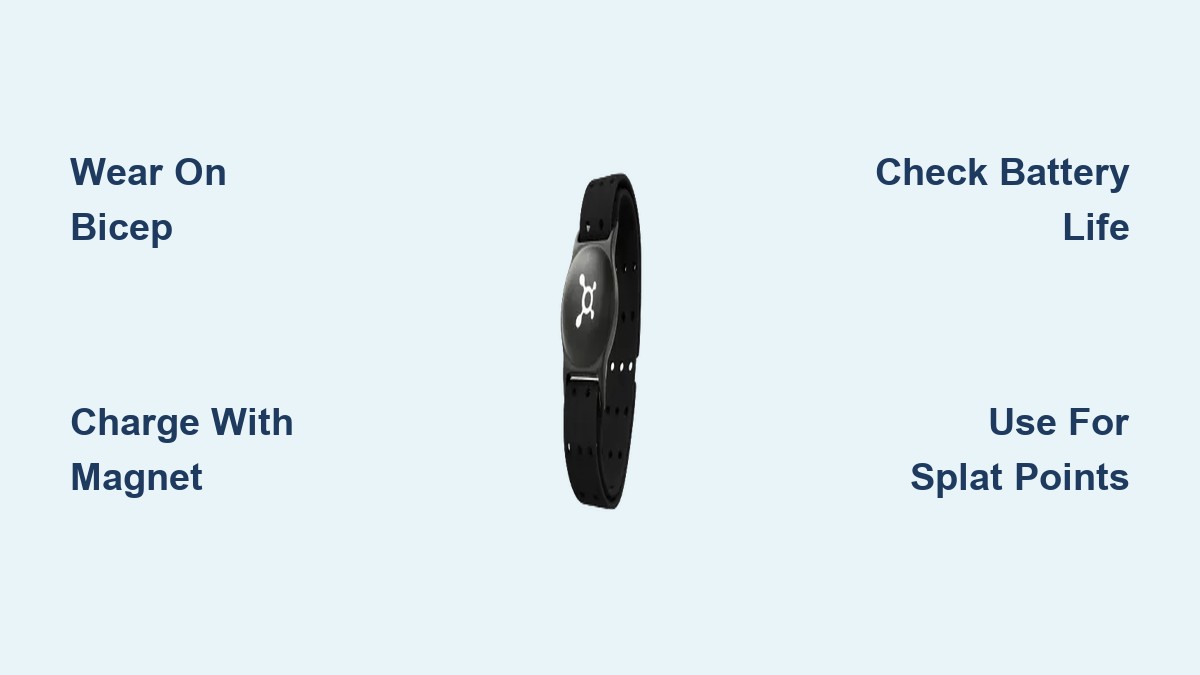
Wear It on Wrist, Forearm, or Bicep
- Wrist: Most convenient, but may pick up motion artifacts during running or rowing.
- Forearm: Balanced option that reduces arm swing interference while staying accessible.
- Bicep: Often the most accurate during high-movement workouts, as it stabilizes the sensor.
To get the best reading:
– Wear the band snugly (two fingers should fit underneath).
– Position the sensor against clean, dry skin.
– Avoid loose clothing that shifts the band during movement.
Adjustability and Fit for All Sizes
The Burn comes with a replaceable armband strap, available in small, medium, and large. The small band measures 10.75 inches, ideal for petite wrists or biceps. Replacement bands are sold separately by Orangetheory and third-party brands, ensuring long-term usability.
Pro tip: If you notice inconsistent readings, try switching positions. Many users report better accuracy on the bicep during treadmill sprints or weight circuits.
Battery Life and Charging Essentials
For frequent gym-goers, battery reliability is critical. The OTbeat Burn delivers solid endurance, but only if charged properly.
Up to 24 Hours of Active Use
- The Burn lasts approximately 24 hours on a full charge.
- For Orangetheory members, that means about 24 one-hour classes per charge.
- Battery life varies slightly based on usage frequency and sync behavior.
Compared to older models like the OTbeat Flex (8-hour battery), the Burn offers triple the runtime, reducing how often you need to recharge.
What You Need to Charge It
- Uses a proprietary magnetic charging cable.
- Fully charges in about 1.5 to 2 hours.
- LED indicator shows charging status (red = charging, green = full).
Critical note: When buying used, confirm the charger is included. Many secondhand listings sell the device without it, and replacement cables aren’t always easy to find.
Accuracy: Optical Sensor vs. Chest Strap
While the OTbeat Burn is highly reliable for studio use, its optical sensor technology has limitations compared to chest-based monitors.
How Optical Sensors Work
The Burn uses photoplethysmography (PPG), a method that shines green light into the skin to detect blood flow changes. It calculates heart rate based on pulse wave frequency.
This works well under stable conditions but can struggle during:
– Rapid heart rate changes
– High-arm-movement activities (e.g., rowing, boxing)
– Sweaty or loose-fitting wear
When to Expect Inaccuracies
Common issues include:
– Cadence lock: During running, the sensor may misread arm motion as pulse.
– Delayed response: Optical sensors lag slightly behind actual heart rate spikes.
– Skin tone and tattoo interference: Darker skin or arm tattoos can reduce signal accuracy.
For maximum precision, move the device to your bicep during intense intervals.
Chest Strap Comparison
Chest straps like the Polar H10 use electrocardiography (ECG) to measure electrical signals from the heart, making them the gold standard for accuracy.
| Feature | OTbeat Burn (Optical) | Polar H10 (Chest Strap) |
|---|---|---|
| Accuracy | Good (90–95%) | Excellent (98%+) |
| Latency | Slight delay | Near real-time |
| Comfort | High (armband) | Moderate (chest band) |
| Best For | Group fitness, general tracking | HIIT, endurance, pro training |
If you’re serious about performance metrics, consider pairing your Burn with a chest strap via dual pairing if supported.
OTbeat Burn vs. Top Alternatives
While the Burn dominates inside Orangetheory studios, other heart rate monitors offer better battery life, lower cost, or superior accuracy.
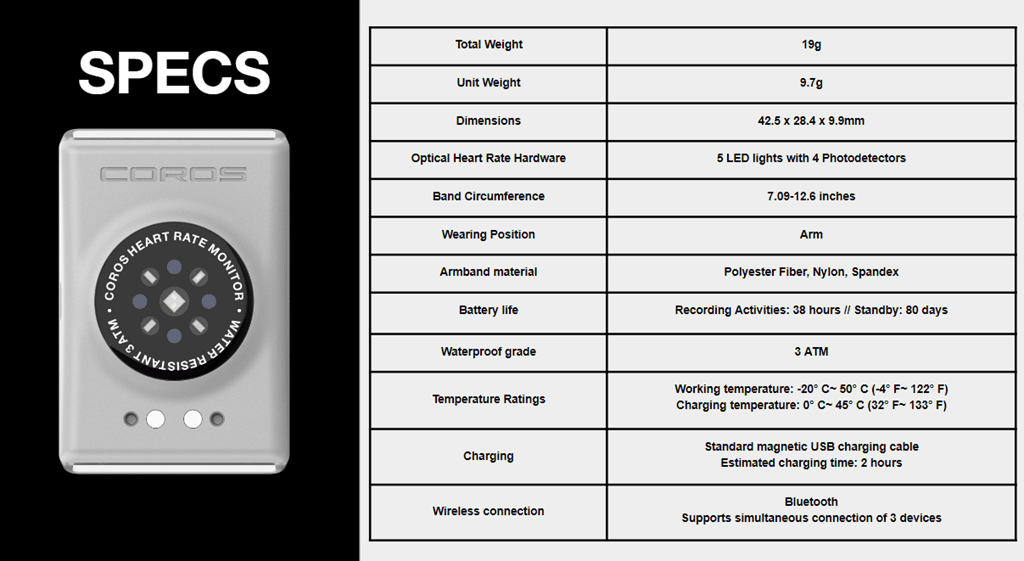
COROS Heart Rate Monitor Armband
- Price: $79.00
- Battery: 38 hours (nearly double the Burn)
- Form Factor: Similar optical armband
- Syncs With: Multiple devices (phone, watch, bike computer)
- FSA/HSA Eligible: Yes
Ideal for multi-sport athletes who want long battery life and cross-platform compatibility.
COOSPO HW9 Optical Armband
- Price: $41.99 (on sale)
- Battery: ~30 hours
- Waterproof: IP67 rated
- Compatibility: Works with Peloton, Zwift, Wahoo
- Connectivity: Bluetooth 5.0 and ANT+
A budget-friendly Burn alternative with solid app integration.
Polar H10 Chest Strap
- Price: $104.95
- Accuracy: Clinical-grade ECG sensor
- Battery: ~400 hours (replaceable CR2032)
- Waterproof: Swim-proof
- FSA/HSA Eligible: Yes
Best for users who prioritize data precision over comfort.
GEOID HS500 Chest Strap
- Price: $22.99 (lowest-cost high-rated option)
- Battery: 800 hours (coin cell)
- Waterproof: IP67
- Connectivity: ANT+ and Bluetooth
- Compatibility: Garmin, Polar, Peloton, Zwift
An unbeatable value for budget-conscious buyers needing long-term reliability.
Using the Burn Outside the Studio
You don’t need to be an Orangetheory member to benefit from the OTbeat Burn. It functions fully as a standalone fitness tracker.
Track Runs, Walks, and Gym Sessions
- Wear it during outdoor runs to monitor heart rate zones.
- Use it for strength training to track exertion between sets.
- Pair with apps like Strava, MyFitnessPal, or Apple Health via Bluetooth to log workouts.
While studio sync is exclusive to OTF locations, basic heart rate and calorie data transfer to most fitness platforms.
Syncing with Third-Party Apps
To connect the Burn to non-Orangetheory apps:
1. Enable Bluetooth on your phone.
2. Open the desired app (e.g., Strava).
3. Go to device settings and search for “OTbeat Burn.”
4. Follow pairing prompts.
Note: Not all features (like Splat Points) will appear outside the Orangetheory ecosystem.
Replacement Bands: Cost and Compatibility
The armband is the most replaceable part of the system. Over time, elastic degrades, straps fray, or sweat causes irritation.
Official vs. Third-Party Bands
| Option | Price | Rating | Notes |
|---|---|---|---|
| OTbeat Burn Small Band (Official) | $6.95 | N/A | Exact fit, brand-matched colors |
| Generic 3-Pack (Third-Party) | $6.99 | 4.0–4.1 stars | Fits same specs, cheaper bulk option |
| FITCENT Replacement Band | $9.99 | 4.1 stars | Durable material, multiple colors |
Third-party bands are often made to the same 10.75-inch small size, making them fully compatible and cost-effective.
Pro Tip: Buy a spare band early. They’re inexpensive and prevent workout interruptions when the original wears out.
Buying Used: What to Check
Many users buy pre-owned OTbeat Burn devices to save money. But there are risks.
Key Checks Before Purchase
-
Does it include the charger?
This is the #1 missing item. Without it, you can’t recharge the device. -
Test the battery life.
Older lithium-ion batteries degrade. A unit that only lasts 5–6 hours may need replacement. -
Inspect the sensor lens.
Scratches or cloudiness can impair optical readings. -
Verify sync functionality.
Ask the seller to demonstrate pairing with the Orangetheory app. -
Check band condition.
Worn straps reduce comfort and sensor stability.
Where to Buy Used Safely
- Facebook Marketplace (local pickup recommended)
- eBay (check seller ratings)
- Orangetheory studio bulletin boards (trusted community sales)
Avoid listings with vague photos or no charger mentioned.
Maintenance Tips for Longevity
Like any wearable, the OTbeat Burn needs care to perform well over time.
Clean Sensor and Band Regularly
- After each workout, wipe the sensor lens with a soft, dry cloth.
- Clean the inside of the band with mild soap and water weekly.
- Let it air dry completely before storing.
Sweat buildup can cause skin irritation and block the optical sensor, leading to inaccurate readings.
Store Properly When Not in Use
- Keep in a cool, dry place.
- Avoid direct sunlight or extreme heat (e.g., leaving it in a hot car).
- Loosen the band slightly to preserve elasticity.
Charge Smartly
- Don’t let the battery drain to 0% regularly.
- Avoid overcharging (unplug once green light appears).
- Recharge every few weeks even if not in use to maintain battery health.
Who Should Use the OTbeat Burn?
The Burn isn’t for everyone, but it’s perfect for specific user types.
Ideal Users
- Orangetheory Members: Essential for Splat Points and leaderboard tracking.
- Zone Training Enthusiasts: Anyone focused on heart rate zone discipline (e.g., 80/20 training).
- Data-Driven Fitness Fans: Users who thrive on metrics and progress tracking.
- Multi-Workout Athletes: Those doing a mix of cardio, strength, and studio classes.
Who Might Prefer Alternatives
- Chest Strap Loyalists: Prioritize accuracy over convenience.
- Ultra-Runners or Cyclists: May prefer longer battery life (COROS, GEOID).
- Budget Buyers: Can get solid performance with sub-$40 chest straps.
- Non-OTF Users: No need for studio-specific hardware.
Frequently Asked Questions About the Burn Heart Rate Monitor
What is the OTbeat Burn heart rate monitor used for?
The OTbeat Burn tracks real-time heart rate zones, calories burned, and Splat Points during Orangetheory workouts. It syncs wirelessly to studio screens so members can see their effort level throughout class, then uploads data to the Orangetheory app for post-workout review.
How long does the OTbeat Burn battery last?
The Burn delivers up to 24 hours of active use on a full charge, enough for roughly 24 one-hour Orangetheory classes. It fully recharges in about 1.5 to 2 hours using a proprietary magnetic cable.
Can I use the OTbeat Burn without an Orangetheory membership?
Yes. The Burn functions as a standalone optical armband for runs, gym sessions, and cycling. It syncs via Bluetooth to third-party apps like Strava and Apple Health, though Splat Points and studio leaderboard features remain exclusive to Orangetheory.
Where should I wear the OTbeat Burn for best accuracy?
Most users get the most accurate readings on the bicep, especially during high-movement exercises like rowing or running. Wrist placement is convenient but more prone to cadence lock, where arm motion is misread as pulse.
Is the OTbeat Burn more accurate than a chest strap?
Chest straps like the Polar H10 use ECG sensors and are generally more accurate (98%+) than optical armbands like the Burn (90–95%). However, the Burn offers greater comfort and easier wear for group fitness settings.
How much does a replacement band for the OTbeat Burn cost?
Official replacement bands cost around $6.95, while third-party options run $6.99 to $9.99. The small band measures 10.75 inches and is widely available in multiple colors.
Key Takeaways for Choosing the Right Burn Heart Rate Monitor
The OTbeat Burn is the gold standard inside Orangetheory studios, offering real-time zone tracking, 24-hour battery life, and flexible wear options that suit most members. For non-members, the device still works as a reliable optical armband, though alternatives like the COROS HRM (38-hour battery) or GEOID HS500 (800-hour battery, $22.99) may offer better value depending on your training style.
If accuracy is your top priority, pair your Burn with a Polar H10 chest strap for clinical-grade data. If budget matters most, the GEOID HS500 delivers impressive endurance at a fraction of the cost. And if you’re buying used, always confirm the charger is included and test the battery before committing.
Your next step: Decide whether you need studio integration or general fitness tracking, then choose the device that matches your workout style and budget. The right heart rate monitor turns guesswork into measurable progress, helping you train smarter every session.