How Fitness Trackers Count Steps Explained
You glance at your wrist after a walk and see a number: 4,237 steps. But how does that small device actually know? Whether you’re pacing during a meeting, pushing a stroller, or jogging a familiar trail, your fitness tracker quietly logs every move. The answer lies in a clever mix of micro-sensors, signal processing, and personalized algorithms working together in real time.
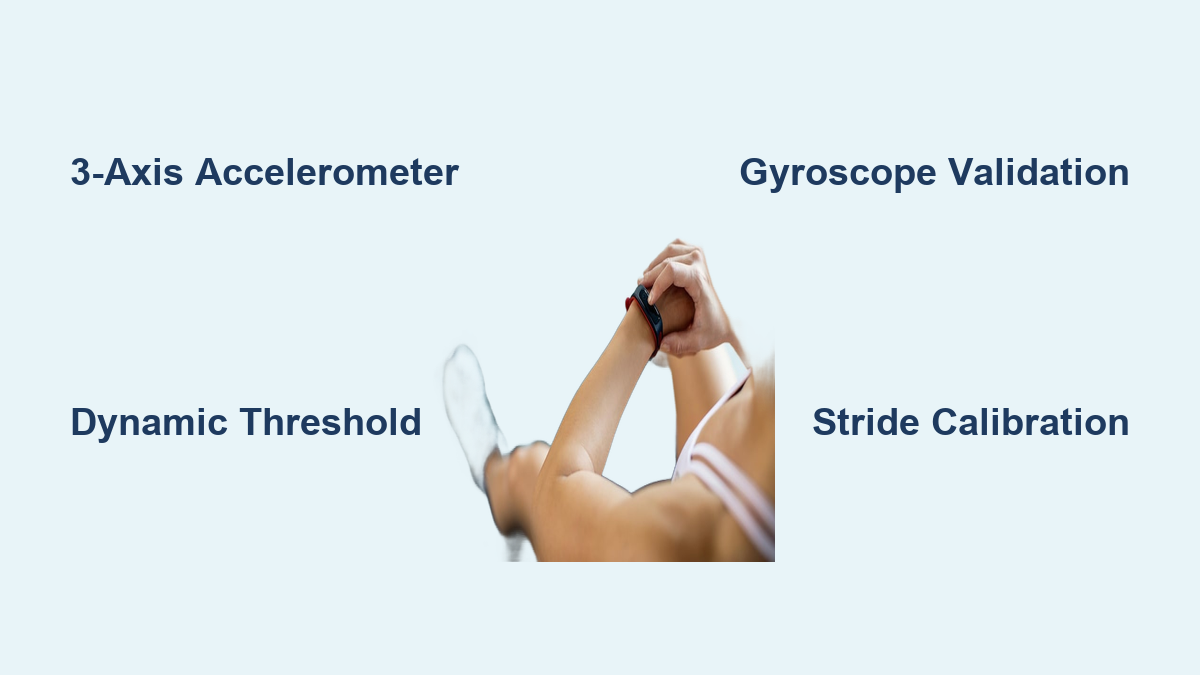
Fitness trackers use a 3-axis accelerometer to detect the rhythmic motion of walking and running. These sensors capture tiny changes in speed and direction as your body moves, then convert that physical motion into digital signals. But sensing movement is only half the challenge. The real magic is filtering out everything that isn’t a step, from arm waves to car rides. In this guide, you’ll learn exactly how raw motion becomes an accurate step count. We’ll cover the sensors, the math, the logic, and the common reasons trackers miscount. By the end, you’ll understand not just that your tracker works, but precisely how it works.
Core Sensor Technology Behind Step Counting
Fitness trackers rely on miniature sensors embedded in the device. These components detect movement continuously and form the foundation of every step count you see.
The 3-Axis Accelerometer
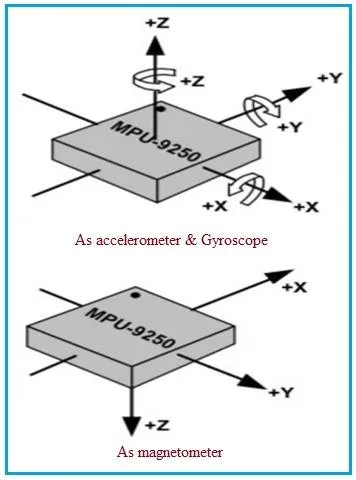
The 3-axis accelerometer is the primary sensor responsible for tracking steps. It measures changes in acceleration along three directions:
– X-axis: Side-to-side motion
– Y-axis: Forward-backward motion
– Z-axis: Up-and-down motion
As you walk, each foot strike creates a small upward jolt followed by a downward drop. This generates a repeating wave pattern in the data. Even if your arm stays still, at least one axis will register these periodic shifts. Unlike older mechanical pedometers that only worked when held perfectly upright, modern accelerometers function regardless of orientation. This 3D detection allows the device to sense motion whether it’s worn on the wrist, clipped to a belt, or carried in a pocket.
The Role of the Gyroscope
Many advanced trackers include a gyroscope, which measures rotational movement. While the accelerometer detects linear motion, the gyroscope identifies angular velocity, or how fast the device is rotating.
During walking, your arms swing in a predictable arc. The gyroscope confirms this rotational pattern, helping the system distinguish between:
– Real walking motion (consistent arm swing plus vertical bounce)
– False triggers like hand waving, typing, or car vibrations
By cross-referencing data from both sensors, the tracker reduces errors and improves accuracy.
The Magnetometer and Orientation Sensing
Some high-end devices also use a magnetometer, essentially a digital compass. It detects the Earth’s magnetic field to determine direction and orientation.
While not directly involved in counting steps, the magnetometer helps refine context. For example:
– Knowing which way the user is facing
– Detecting changes in posture or device rotation
– Assisting GPS-based distance tracking when outdoors
Its role is secondary to the accelerometer and gyroscope but supports overall activity classification.
How Signal Processing Cleans Up the Data
Raw sensor data is messy. Before a step can be counted, the device must clean and interpret the signal using a series of digital filters.
Calculating Total Acceleration
Since the tracker can be worn at any angle, it needs to combine all three axes into a single movement metric. It does this by calculating the total acceleration magnitude using the formula:
$$a_{total} = \sqrt{a_x^2 + a_y^2 + a_z^2}$$
This turns 3D motion into one continuous value that reflects overall movement intensity, regardless of how the device is positioned.
Removing Gravity Interference
The accelerometer constantly reads gravity (approximately 9.81 m/s²), which skews movement data. To isolate actual motion, the system removes this static force using a low-pass filter.
Here’s how it works:
– Gravity changes slowly, so a low-pass filter estimates its value over time
– That estimated gravity is subtracted from total acceleration
– The result is linear acceleration, which is pure movement without gravitational bias
This cleaned signal reveals only the dynamic motion caused by walking or running.
Smoothing and Filtering Noise
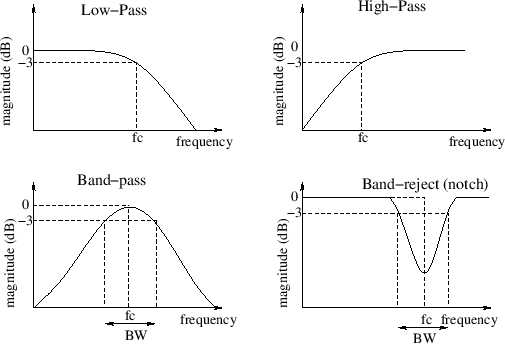
Even after removing gravity, the signal contains noise from small vibrations, device jitter, or muscle tremors. A digital smoothing filter removes this interference.
Common approaches include:
– Low-pass filter: Blocks rapid, high-frequency spikes such as hand tapping
– High-pass filter: Eliminates slow drifts such as gradual tilting of the wrist
The filtered output is a clean, wave-like pattern that closely matches human gait cycles, making it easier for the algorithm to detect steps.
Step Detection Logic and Algorithms
Once the signal is clean, the tracker applies intelligent rules to decide what counts as a step.
Dynamic Threshold Detection
Instead of using a fixed sensitivity level, most trackers use a dynamic threshold that adjusts in real time.
How it works:
– The algorithm monitors recent peaks and valleys in the acceleration signal
– It calculates an average baseline (midpoint between max and min)
– Steps are registered when the signal drops below this baseline with a downward slope
Because the threshold adapts to current movement levels, it stays accurate whether you’re strolling slowly or sprinting.
Axis Selection and Motion Validation
Not all axes show equal movement. The tracker evaluates all three and selects the one with the largest change in acceleration to base its count on.
If none exceed a minimum movement threshold, the motion is ignored. This prevents:
– Tiny hand gestures from being miscounted
– Minor vibrations (like sitting in a moving car) from triggering false steps
Only clear, significant movements are considered potential steps.
Time Window Validation
Humans have physical limits on how fast or slow they can walk. Trackers use this fact to filter out impossible cadences.
Valid step timing:
– Minimum: 1 step every 2 seconds (0.5 steps per second) for slow walking
– Maximum: 5 steps per second for sprinting
At a standard 100 Hz sampling rate (10 ms per sample), this translates to:
– Minimum interval: 200 samples (2.0 seconds)
– Maximum interval: 20 samples (0.2 seconds)
Any “step” detected outside this window is rejected as invalid, which blocks false counts from shaking or random motion.
Frequency and Pattern Recognition
Beyond timing, the system analyzes the frequency of the signal. Walking produces a consistent rhythm, typically between 1 and 3 Hz (60 to 180 steps per minute).
If the peaks occur too irregularly or at non-human frequencies, the tracker ignores them. This helps reject:
– Repetitive typing motions
– Arm movements while driving
– Accidental device shaking
Only rhythmic, gait-like patterns are counted.
Advanced Features That Improve Accuracy

Modern trackers go beyond basic step counting by adding layers of intelligence to improve reliability.
Machine Learning Classification
High-end devices use machine learning models trained on thousands of real-world walking patterns. These models classify motion types with high precision.
They can distinguish between:
– Walking versus running
– Arm swinging while walking versus brushing teeth
– Pushing a stroller versus normal gait
Over time, the model adapts to your unique movement style, reducing errors.
Context-Aware Sensitivity
Some trackers adjust sensitivity based on detected activity:
– Lower sensitivity during typing or driving
– Higher sensitivity during workouts
– Auto-pause when motion stops for more than a few seconds
This dynamic adjustment prevents overcounting during sedentary activities.
User Calibration and Gait Learning
Trackers improve accuracy by learning about you:
– Initial setup asks for height, weight, gender, and stride length
– Some let you calibrate stride by walking a known distance
– Over days of use, the device learns your natural cadence and swing pattern
This personalization helps convert steps into accurate distance and calorie estimates.
How Placement Affects Step Accuracy
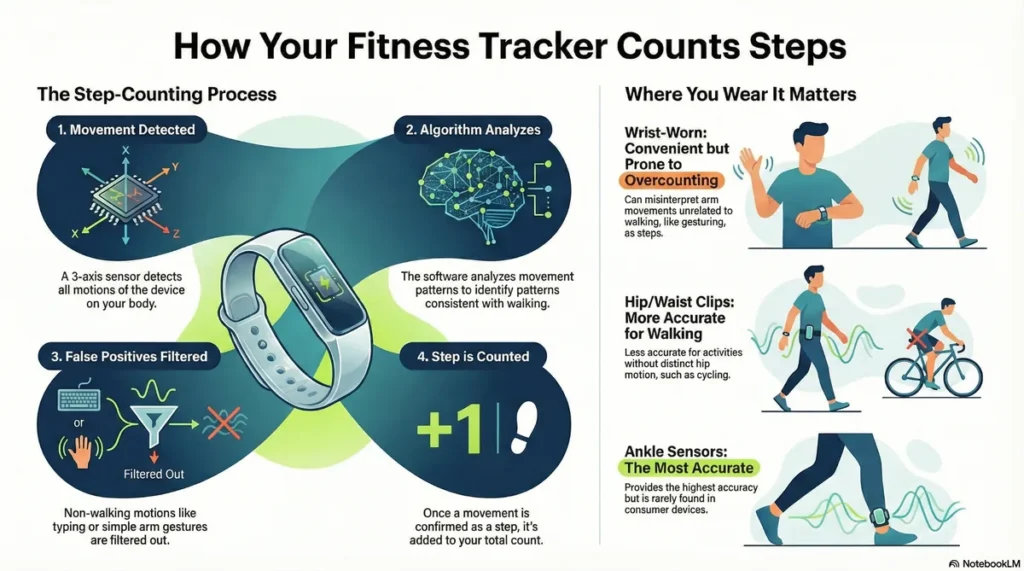
Where you wear your tracker significantly impacts how well it counts steps.
Wrist-Worn Device Limitations
Wrist trackers are convenient but prone to errors because they rely on arm swing, not foot strikes.
Common issues include:
– Undercounting: When arms are still, such as pushing a shopping cart or carrying bags
– Overcounting: During non-walking arm motions like cooking or washing your face
Despite this, they remain popular due to ease of use.
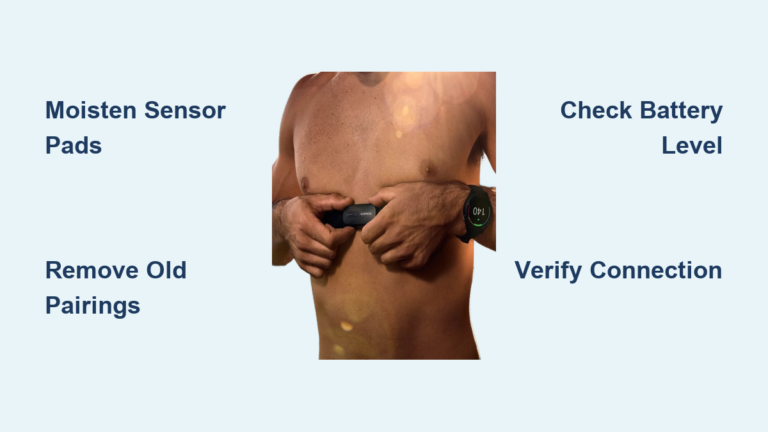
Waist and Chest Placement Benefits
Devices worn on the hip or chest track body trunk movement, which correlates more directly with walking.
Advantages include:
– Less affected by arm motion
– More consistent during push-cart walking
– Better detection of slow or irregular gait
These positions are often used in medical studies for higher accuracy.
Ankle and Smartphone Tracking
- Ankle-worn trackers are considered the gold standard because they detect actual foot contact and rarely miss steps
- Smartphones in pockets perform well but vary based on pocket depth and walking style
- Phones in bags or hands tend to be less reliable due to inconsistent motion coupling
For best results, keep your phone in a front pocket during walks.
Speed and Activity Challenges
Step counting accuracy varies depending on how you move.
Slow Walking Errors
Research published in PeerJ found that both consumer and research-grade trackers undercount slow walking.
Why?
– Acceleration peaks are too small to cross the detection threshold
– Cadence may fall below the 0.5 steps per second minimum
– Arm swing diminishes at very slow speeds
This is especially relevant for older adults or rehabilitation patients.
Fast Walking and Running Limits
At very high speeds (near 5 steps per second), some trackers may:
– Miss steps due to rapid cadence
– Misinterpret double-taps as single steps
– Hit software-imposed upper limits
However, most modern devices handle running well thanks to optimized algorithms.
Intermittent Movement Gaps
Daily life includes frequent stops for talking, waiting, or turning corners. These start-stop patterns challenge trackers.
Common problems include:
– Failing to detect short bursts of fewer than 10 steps
– Misaligning step cycles after pauses
– Double-counting during quick direction changes
Consistent walking yields better accuracy than fragmented movement.
Calibration and Setup Essentials

Proper setup boosts tracking accuracy from day one.
Input Personal Data
Always enter:
– Height and weight: Used to estimate stride length and calorie burn
– Gender: Helps refine metabolic calculations
– Age: Some models adjust for typical gait changes with age
These inputs allow the tracker to personalize distance and energy estimates.
Manual Stride Calibration
For precise distance tracking:
1. Walk 10 or 20 meters on flat ground
2. Count your steps
3. Divide distance by step count to get stride length in meters
4. Enter this value in your app settings
Example: 20 meters ÷ 25 steps = 0.8 m per step
This eliminates guesswork in distance reporting.
Automatic Baseline Adjustment
Many trackers run a startup calibration:
– Takes 100 initial samples to set sensor baselines
– Adjusts for how you naturally wear the device (tilted, loose, etc.)
– Updates thresholds dynamically during use
This ensures consistent performance across different wear styles.
Real-World Use and Health Insights
Step tracking isn’t just about numbers. It’s a tool for behavior change.
Goal Setting and Motivation
Trackers help users:
– Set daily targets such as 8,000 or 10,000 steps
– Break big goals into daily actions
– See progress via charts and notifications
Visual feedback increases motivation and consistency.
Guideline Alignment
While “10,000 steps” isn’t an official medical rule, it aligns loosely with the Physical Activity Guidelines for Americans, which recommend:
– 150 to 300 minutes of moderate activity weekly
– Equivalent to roughly 7,000 to 8,000 steps per day for most people
Aim for 5,000 or more steps per day as a baseline for health benefits.
Social Sharing and Accountability
Many apps let you:
– Share progress with friends
– Join step challenges
– Earn badges for milestones
This social layer boosts engagement and long-term adherence.
Research and Scientific Applications
Fitness trackers have become valuable tools beyond personal use.
Large-Scale Data Collection
Researchers use wearables to:
– Monitor activity in thousands of participants
– Study population trends in physical activity
– Track changes during interventions such as weight loss programs
This scale was impossible with traditional self-reports.
Objective Measurement Advantage
Compared to surveys or diaries, trackers offer:
– Continuous, real-time data
– No recall bias
– Automated logging
They provide a more accurate picture of actual behavior.
Need for Validation
Before using consumer trackers in studies, researchers must:
– Validate against ankle-mounted reference devices
– Account for known error margins (approximately ±5 to 15%)
– Choose models proven accurate in peer-reviewed tests
Despite limitations, they’re effective for large observational studies.
Frequently Asked Questions About Fitness Tracker Step Counting
What sensor do fitness trackers use to count steps?
Fitness trackers primarily use a 3-axis accelerometer, a MEMS (Microelectromechanical Systems) sensor that measures acceleration along three directions: side-to-side, forward-backward, and vertical. Many advanced devices also include a gyroscope to detect rotational movement and validate that motion matches a walking pattern.
Why does my fitness tracker undercount steps when I walk slowly?
Slow walking produces smaller acceleration peaks that may not cross the dynamic detection threshold. Additionally, your cadence may fall below the algorithm’s minimum of 0.5 steps per second, and arm swing diminishes at slow speeds. A 2020 PeerJ study confirmed that both consumer and research-grade trackers tend to undercount during slow walking.
How accurate are wrist fitness trackers compared to ankle or waist devices?
Wrist trackers are convenient but less accurate because they rely on arm swing rather than foot strikes. Waist and chest devices track body trunk movement more directly and generally perform better. Ankle-worn trackers are considered the gold standard for accuracy because they directly measure foot contact.
Can fitness trackers count steps from non-walking movements like typing or driving?
Modern trackers use multiple validation techniques to reject non-walking movements. They check timing windows (steps must occur 0.2 to 2.0 seconds apart), analyze frequency patterns, and use gyroscope and machine learning data to distinguish walking from typing, driving, or random vibrations.
Do I need to calibrate my fitness tracker for accurate step counting?
Yes, calibration improves accuracy. Enter your height, weight, and gender during setup. For better distance tracking, manually calibrate your stride by walking a known distance, counting your steps, and dividing distance by step count. Many trackers also run automatic startup calibration using 100 initial sensor samples.
Why do fitness trackers sometimes overcount steps?
Overcounting usually happens when non-walking arm movements (like cooking, brushing teeth, or washing dishes) mimic the rhythmic pattern of walking. Wrist placement makes this more likely. Trackers reduce these errors using gyroscope validation, frequency analysis, and machine learning classification trained to recognize real gait patterns.
Key Takeaways for Understanding Fitness Tracker Step Counting
Fitness trackers count steps by combining MEMS accelerometers, smart filtering, and adaptive algorithms. They detect rhythmic motion, remove noise, validate timing, and learn from your habits. While not perfect, especially during slow walking or limited arm movement, they offer reliable estimates for daily activity tracking.
For best results, wear the device consistently in the same position, calibrate your stride manually, and understand its limitations. If accuracy matters most for health or research purposes, consider ankle or chest placement over wrist wear. With proper use, your tracker becomes a powerful ally in staying active and meeting health goals.